Essential Access & Tracking QA Checklist for New SaaS PPC Agencies
A practical access and tracking QA checklist for new SaaS PPC agencies: account access, tracking verification, CRM permissions, and data integrity.

A new agency gets access on day three. Campaigns go live by day ten. Three weeks later, the client asks why pipeline numbers in the board deck do not match what the agency is reporting. Nobody skipped a step on purpose. The account access was granted, the pixel fired, the dashboard populated. The problem was never visible until someone with a CRM export sat down and reconciled it by hand.
This is the failure mode access and tracking QA for SaaS PPC agencies is built to prevent. A proper SaaS PPC agency tracking checklist is not glamorous work. It does not show up in a pitch deck. But it is the difference between a marketing operations specialist who trusts the numbers coming out of a new agency partnership and one who is quietly rebuilding every report in a spreadsheet because the platform data does not reconcile with the CRM.
Why Access & Tracking QA Matters More Than the Kickoff Call
Most onboarding conversations focus on strategy: audience targeting, budget pacing, creative testing cadence. Quality assurance for access and tracking in new SaaS PPC agencies rarely gets the same airtime, because it feels like plumbing rather than strategy. That is exactly why it causes the most damage when it is skipped.
A SaaS buying committee moves through weeks or months of touchpoints before a deal closes. If tracking is misconfigured in week one, every report built on top of it for the next quarter inherits the error. Attribution accuracy in SaaS marketing depends entirely on the tracking foundation being correct before campaigns start optimising against it, not after someone notices the numbers look wrong.
Refine Labs has argued for years that last-touch attribution already understates the influence of dark social and offline channels in B2B buying journeys. A broken tracking setup compounds that problem. It does not just under-report one channel, it corrupts the comparison between all of them, and a marketing operations specialist ends up making budget decisions on data that was never accurate to begin with.
Account Access: The First 48 Hours
Access issues are the most common and the most preventable failure point in agency onboarding. They are also the easiest to check off a list without actually verifying they work.
What to confirm in the first two days:
- Google Ads account access is granted at the correct permission level (Admin, not just Standard, if the agency needs to manage conversion actions)
- LinkedIn Campaign Manager access matches the account structure the agency will actually manage
- Google Analytics 4 property access includes Editor or Administrator rights, not just Viewer
- Google Tag Manager container access allows publishing changes, not just previewing them
- CRM read and write access is scoped correctly (see the CRM permissions section below)
- Billing ownership sits with the client, with the agency granted management rights rather than billing rights, unless the engagement is structured otherwise
A common pitfall in SaaS PPC tracking is treating access as binary: either someone has it or they do not. In practice, the permission level matters as much as the grant itself. An agency with Viewer access to GA4 can look at reports but cannot fix a broken event, which means every tracking issue discovered in week two becomes a support ticket to the client rather than something the agency resolves directly.
Best practices for QA in SaaS marketing at this stage mean verifying access by attempting the action, not by checking a box. Log in. Try to create a test conversion action. Try to publish a container version. If something fails silently, better to find out on day two than day twenty.
Tracking Verification: Confirming the Pixel Actually Fires
Tracking verification for SaaS PPC agencies is where most access and tracking QA processes get thin. Confirming that a tag exists is not the same as confirming it fires correctly, on the right pages, for the right events, every time.
The current standard for 2026 makes this harder than it used to be. Consent Mode V2 is now effectively mandatory for advertisers with any EEA traffic, and it introduces two additional parameters, ad_user_data and ad_personalization, that sit alongside the existing consent signals. When a user declines consent, tags fire in a restricted mode and platforms model the conversions that would otherwise have been observed. That is a reasonable compromise for privacy compliance, but it means a tracking QA process now has to check consent behaviour specifically, not just whether the tag fires.
Tools for tracking QA in PPC campaigns should be used in this order:
- GTM Preview mode, to confirm the tag fires on the correct trigger
- GA4 DebugView, to confirm the event lands with real parameter values rather than blank fields
- A consent-state test, checking tag behaviour under both granted and denied consent
- The platform's own diagnostics (Google Ads Tag Assistant, LinkedIn Insight Tag Helper) as a final cross-check
Data quality issues in PPC campaigns are rarely dramatic. A tag that fires on the wrong page, a form submission event that fires on page load instead of on submit, a thank-you page URL that changed during a site redesign and quietly broke a goal that nobody rechecked. Each of these looks fine at a glance and produces subtly wrong numbers for months.
Where server-side tagging is in place, the QA process needs an extra step. Consent parameters have to propagate from the client-side container to the server container correctly, and that propagation is exactly where most server-side setups break. A client-side scan alone will not catch this. It requires checking server logs or the server container's own preview mode.
CRM Permissions: The Access Layer Nobody Audits
CRM permissions for SaaS marketing sit in an odd spot. The agency did not build the CRM, does not own the sales process, and often gets access granted quickly just to unblock reporting, without anyone thinking through what that access actually needs to do.
The right question is not “does the agency have CRM access” but “does the agency have the specific access required to close the loop between ad spend and closed-won revenue.” That usually means:
- Read access to lead source, campaign, and UTM fields on the contact or lead object
- Read access to opportunity or deal stage, so pipeline and revenue can be tied back to the original touchpoint
- Write access, if the agency is responsible for maintaining UTM parameter hygiene or campaign field mapping
- Visibility into the specific pipeline or deal fields that map to the client's actual sales process, since a generic CRM export often uses field names that do not match how the sales team actually works
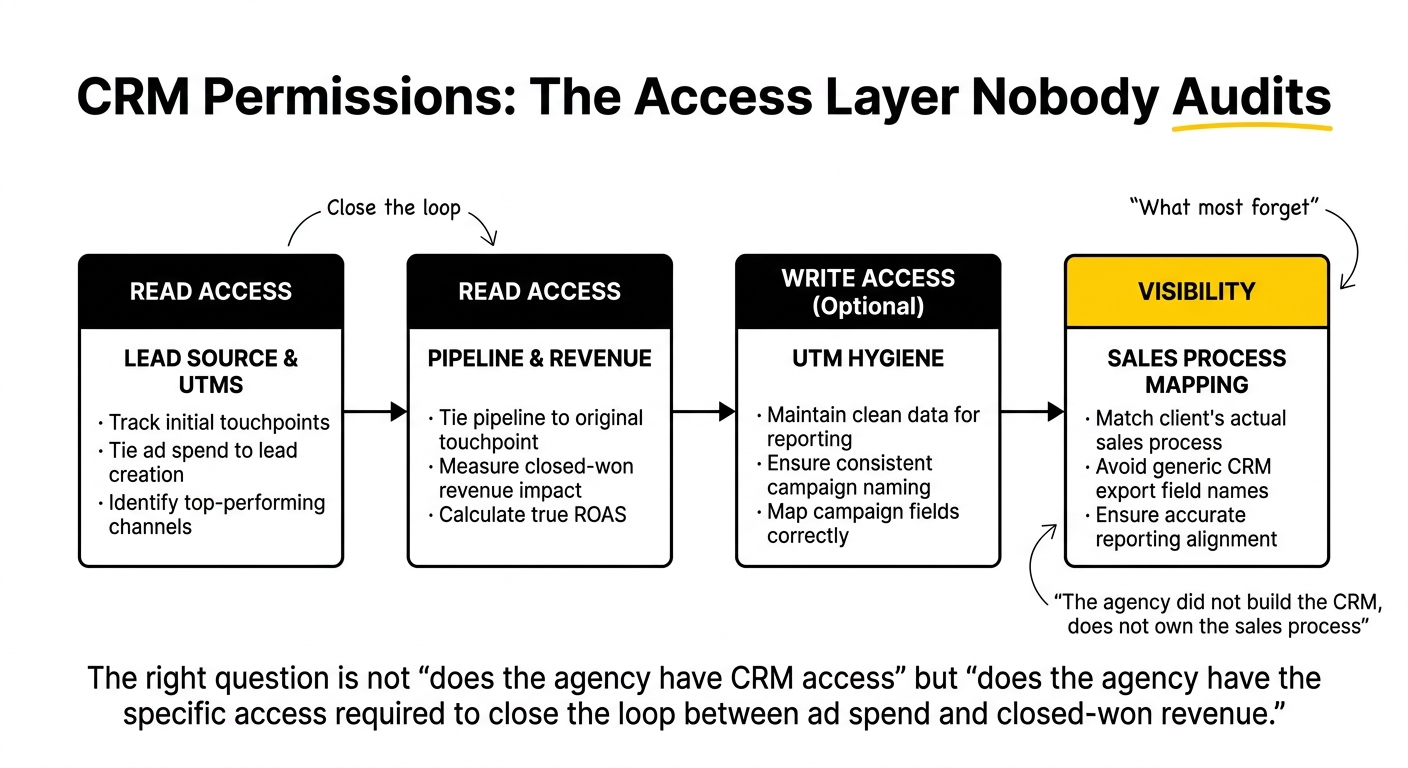
Marketing operations specialists tend to know exactly where this goes wrong, because they are the ones who get asked to explain a discrepancy between platform-reported conversions and CRM-reported opportunities. If the agency cannot see deal stage, they cannot flag a lead source field that stopped populating correctly after the last CRM update, and that gap sits invisible until someone runs a manual reconciliation.
A Marketing Operations Checklist for New SaaS Agencies
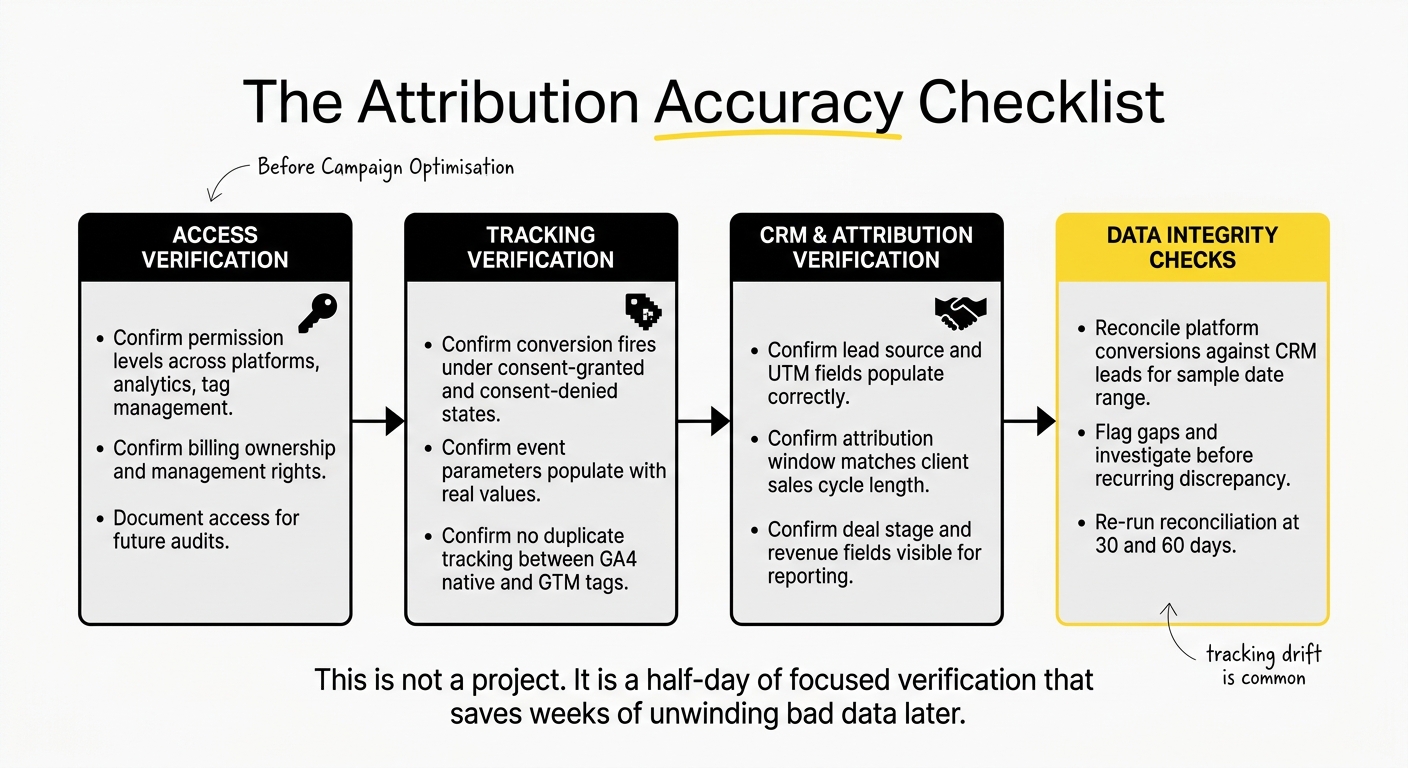
Bringing the pieces together, a marketing operations checklist for SaaS agencies at onboarding should cover four categories before any campaign optimisation begins.
Access verification:
- Confirm permission levels, not just access grants, across ad platforms, analytics, and tag management
- Confirm billing ownership and management rights are correctly separated
- Document who has access to what, and when it was granted, for future audits
Tracking verification:
- Confirm every conversion action fires correctly under both consent-granted and consent-denied states
- Confirm event parameters populate with real values, not blank or default fields
- Confirm no duplicate tracking exists between GA4 native tags and GTM-managed tags
CRM and attribution verification:
- Confirm lead source and UTM fields populate correctly on new records
- Confirm the attribution window matches the client's actual sales cycle length, not a platform default
- Confirm deal stage and revenue fields are visible to whoever owns reporting
Data integrity checks:
- Reconcile platform-reported conversions against CRM-reported leads for a sample date range before trusting either number
- Flag any gap between the two and investigate before it becomes a recurring reporting discrepancy
- Re-run the same reconciliation at 30 and 60 days, since tracking drift is common as sites update and consent behaviour shifts
This is not a project. It is a half-day of focused verification that saves weeks of unwinding bad data later. It also sets up the account audit that typically follows in week one: a Week-One SaaS PPC Account Audit Sprint goes deeper into campaign structure and spend once access and tracking have been confirmed clean.
Integrating QA With the Client's MarTech Stack
Seamless integration for SaaS PPC agencies is often used as a synonym for “the agency did not break anything,” which sets far too low a bar. The actual goal is integration that survives contact with the client's existing stack: the CRM fields sales already relies on, the reporting dashboards the CMO already reads, the attribution model finance has already agreed to.
This is where a QA process either respects the existing stack or quietly fights it. If a client already runs a documented multi-touch attribution model in HubSpot or Salesforce, a new agency layering in a different model without reconciling the two creates two competing versions of the truth. Governance of the attribution model, meaning who owns it, who can change it, and how changes get communicated, matters as much as the technical setup.
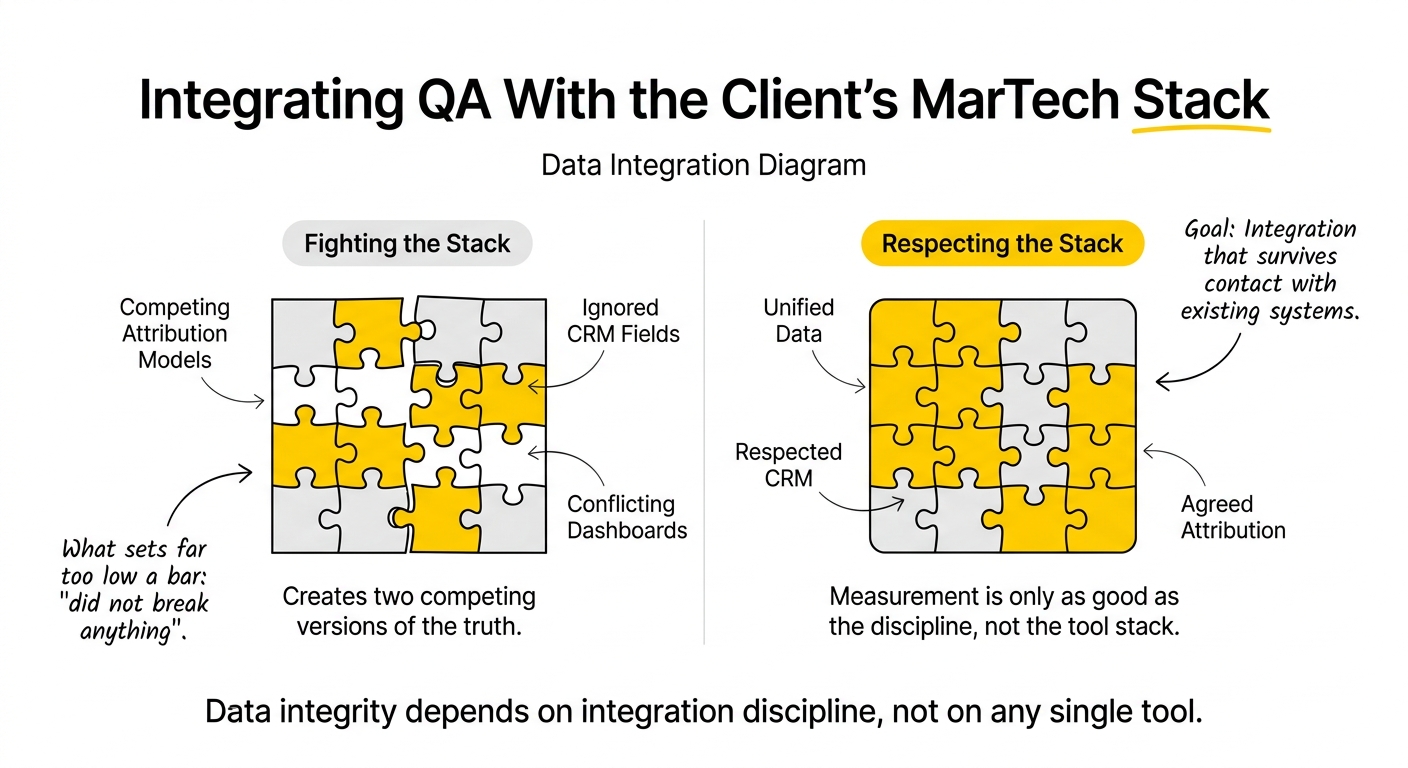
Data integrity in SaaS PPC campaigns depends on this kind of integration discipline more than on any single tool. The best tracking setup in the world still produces unreliable numbers if it exists in parallel to, rather than in conversation with, the reporting the rest of the business already trusts. This overlaps closely with how we approach saas analytics more broadly: measurement is only as good as the discipline behind it, not the tool stack layered on top.
Common Pitfalls to Avoid
A few patterns show up repeatedly across SaaS PPC agency onboarding:
- Verifying access exists, not that it works. A login is not the same as a functioning permission set.
- Treating tracking QA as a one-time task. Consent behaviour, site changes, and CRM field updates all drift over time. Re-verify at 30 and 60 days.
- Skipping the CRM side entirely. Platform-side tracking can look perfect and still be disconnected from what sales actually reports as closed-won.
- Overwhelming the client with an implementation project. Access and tracking QA should read as a disciplined half-day process, not a six-week technical migration that delays the first real campaign work.
- Assuming the previous agency's setup was correct. Inherited tracking should be verified from scratch, not assumed to still be working the way it was originally configured.
Where Upraw Draws the Line
Access and tracking QA is not a differentiator agencies talk about publicly, and it should not need to be. It is table stakes. The teams that skip it are betting that nobody checks the reconciliation closely enough to notice, and in SaaS, with long sales cycles and multiple stakeholders reviewing the numbers, that bet does not pay off for long.
If your team is bringing on a new PPC partner and wants a second set of eyes on the access and tracking setup before campaigns scale, that is a conversation worth having early, not after the first quarterly report raises questions.
Frequently Asked Questions
What are some best practices for access and tracking QA in SaaS PPC agencies?
Verify permission levels rather than just access grants, test tracking under both consent-granted and consent-denied states, and reconcile platform-reported conversions against CRM data before trusting either number. Treat QA as an ongoing check, not a one-time setup task.
How can new SaaS PPC agencies ensure data integrity in their tracking systems?
Reconcile platform data against CRM data for a sample date range early in the engagement, then repeat the reconciliation at 30 and 60 days. Data integrity in SaaS PPC campaigns depends on catching drift before it compounds across months of reporting.
What common pitfalls should new SaaS PPC agencies avoid in tracking verification?
The most common pitfalls are confirming a tag exists without confirming it fires correctly, skipping consent-state testing, and assuming an inherited tracking setup from a previous agency is still working as originally configured. Each should be verified directly rather than assumed.
How can agencies verify attribution accuracy in their campaigns?
Confirm the attribution window matches the client's actual sales cycle length rather than a platform default, and check that CRM fields for lead source, campaign, and deal stage populate consistently. Attribution accuracy in SaaS marketing depends on the CRM and ad platform data agreeing, not just on the model chosen.
What role does CRM permissions play in access and tracking QA?
CRM permissions determine whether an agency can see the full path from ad spend to closed-won revenue. Without read access to lead source and deal stage fields, an agency cannot diagnose a reporting discrepancy or flag a broken field mapping before it affects a board-level report.
What are the key components of a comprehensive checklist for tracking quality assurance?
A comprehensive checklist covers access verification (permission levels, not just grants), tracking verification (consent-state testing, event parameter checks), CRM and attribution verification (field mapping, attribution window), and data integrity checks (platform-to-CRM reconciliation at set intervals).
How can marketing operations specialists integrate QA processes with their MarTech stack?
Start by identifying the attribution model and reporting structure the business already trusts, then verify that new tracking respects it rather than introducing a competing version. Governance of who owns the attribution model matters as much as the technical setup itself.
What are the most important metrics to track for reliable reporting in PPC campaigns?
Cost-per-opportunity and closed-won revenue matter more than clicks or impressions for SaaS reporting that holds up in board meetings. These metrics only stay reliable if the tracking and CRM data behind them have been verified to agree with each other.
How can new agencies streamline their implementation projects without overwhelming clients?
Frame access and tracking QA as a focused half-day verification process rather than a multi-week technical migration. A checklist-driven approach keeps the work contained and lets campaign strategy start on schedule.
What tools can assist in ensuring reliable measurement and data quality for SaaS PPC agencies?
GTM Preview mode and GA4 DebugView catch most tag-level issues, while platform diagnostics like Tag Assistant provide a final cross-check. None of these substitute for a manual reconciliation between platform-reported conversions and CRM-reported leads.
If your team is working through an access and tracking QA process for a new agency partnership, we are happy to take a look at your setup and flag anything that needs attention before it shows up in a board deck.


.png)