Mastering GA4 and GTM for Effective SaaS PPC Measurement
How to build reliable GA4 and GTM foundations for SaaS PPC measurement, covering event tracking, consent mode v2, parameter governance, and tag documentation.

Your GA4 dashboard says one thing. Google Ads says another. The CRM says something else entirely. Meanwhile, the CFO wants to know which campaigns are actually driving pipeline.
This is the reality for most SaaS marketing ops teams. It is not a data problem. It is a measurement foundations problem. The signals are there, but they are poorly structured, inconsistently named, or silenced entirely by a consent setup that strips more data than it recovers.
GA4 and GTM give you everything you need to build reliable PPC measurement. But only if the underlying foundations are right: the event taxonomy, the parameter schema, the consent architecture, and the governance that keeps it from drifting as your stack evolves. This guide covers all four, with SaaS-specific configuration in mind.
For a broader look at analytics strategy across the funnel, start with our SaaS analytics hub.

Why GA4 Tracking Setup for SaaS Looks Different
SaaS buying journeys do not follow a neat path. Someone visits your pricing page three times across six weeks, fills in a trial form on a work laptop, and converts to a paid plan via a link in your onboarding email. GA4 can surface most of that journey. But only if your event tracking setup reflects what actually matters at each stage.
There are two distinct GTM motion types to account for, and they require different tracking priorities.
Sales-led SaaS treats the demo request, the trial sign-up, or the contact form as the primary conversion event. Pipeline is the metric that matters. Your GA4 configuration should be built around capturing these hand-raisers cleanly and passing them back to Google Ads for optimisation.
Product-led growth (PLG) SaaS has a more granular problem. The conversion is buried inside the product. What matters upstream is trial activation, feature adoption milestones, and trial-to-paid transitions. Your tracking needs to capture product intent signals, not just form fills.
Most SaaS teams sit somewhere between these two models. The implication is that there is rarely a universal GA4 event schema. You build for your GTM motion.
Building a GA4 Event Schema That Holds
The most common GA4 mistake is tracking everything and structuring nothing. A property with 80 custom events and no naming convention produces noise, not insight.
Start by defining your conversion events and your micro-conversion funnel. For a typical B2B SaaS PPC setup, the conversion event hierarchy looks something like this:
Primary conversion events (mark as key events in GA4):
demo_request_submittedortrial_signup_completedcontact_form_submittedpricing_page_cta_clicked(if this triggers a form)
Micro-conversion events (track but do not mark as key events by default):
pricing_page_viewedfeature_page_scrolled(if scroll depth exceeds 75%)resource_downloadedtrial_feature_used(for PLG setups)video_completed(for demo or explainer content)
The naming convention matters more than most teams realise. GA4 is case-sensitive and has a 500-event limit per property. Use snake_case consistently. Use action verbs: demo_request_submitted is unambiguous. DemoRequest or demo-request will fragment your data across platforms when different tags fire them differently.
Parameters are where the SaaS-specific value lives. At minimum, every conversion event should carry:
campaign_name(pulled from UTM via a GTM variable)campaign_mediumcampaign_sourcelead_type(demo, trial, contact, etc.)form_location(homepage, pricing page, blog, etc.)
This parameter schema is what enables segmentation in GA4 Explorations and reliable comparison between paid channels. Without it, you are looking at blended conversion counts with no ability to attribute them to specific campaign types or landing pages.
GTM Setup: Tag Governance and Documentation
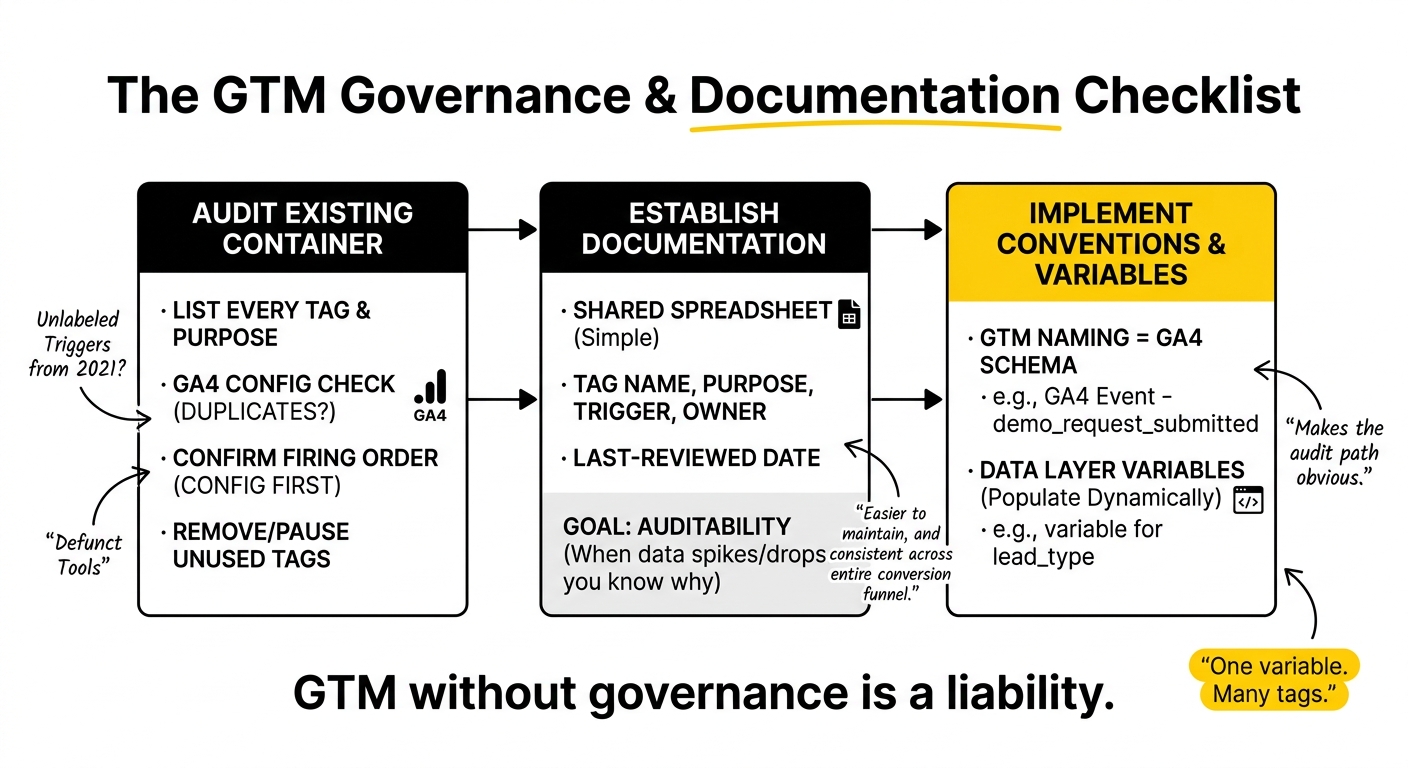
GTM without governance is a liability. Most SaaS marketing ops teams inherit a GTM container with tags from three previous contractors, two defunct tools, and a handful of unlabelled triggers from 2021. This is where attribution discrepancies often originate.
Before building on top of an existing GTM container, audit it.
GTM audit checklist:
- List every deployed tag, its purpose, and the tool it fires for
- Identify all GA4 configuration tags and check for duplicates (duplicate GA4 tags are one of the most frequent causes of inflated event counts)
- Confirm the firing order: GA4 config tag should fire before any GA4 event tags
- Check for overlapping triggers that could cause double-firing
- Remove or pause tags for tools that are no longer in use
GTM container documentation does not need to be complex. A shared spreadsheet with tag name, purpose, trigger, owner, and last-reviewed date is sufficient. The goal is not bureaucracy, it is auditability. When conversion data spikes or drops, you need to know whether a tag change caused it.
Naming conventions inside GTM should mirror your GA4 event schema. If the GA4 event is demo_request_submitted, the GTM tag should be named GA4 Event - demo_request_submitted and the trigger Form Submission - Demo Request. This makes the audit path obvious.
Variable layers are underused. A GTM Data Layer variable for lead_type lets you populate that parameter dynamically across multiple form tags without hardcoding it into each one. One variable. Many tags. Easier to maintain, and consistent across your entire conversion funnel.
For more on integrating GTM with your CRM for downstream attribution, see our article on GTM CRM integration for paid acquisition signals.
GTM Consent Management for PPC: The Architecture That Actually Works
Consent mode is not a compliance checkbox. For any SaaS running PPC to EEA or UK audiences, it is a measurement infrastructure decision with direct revenue implications.
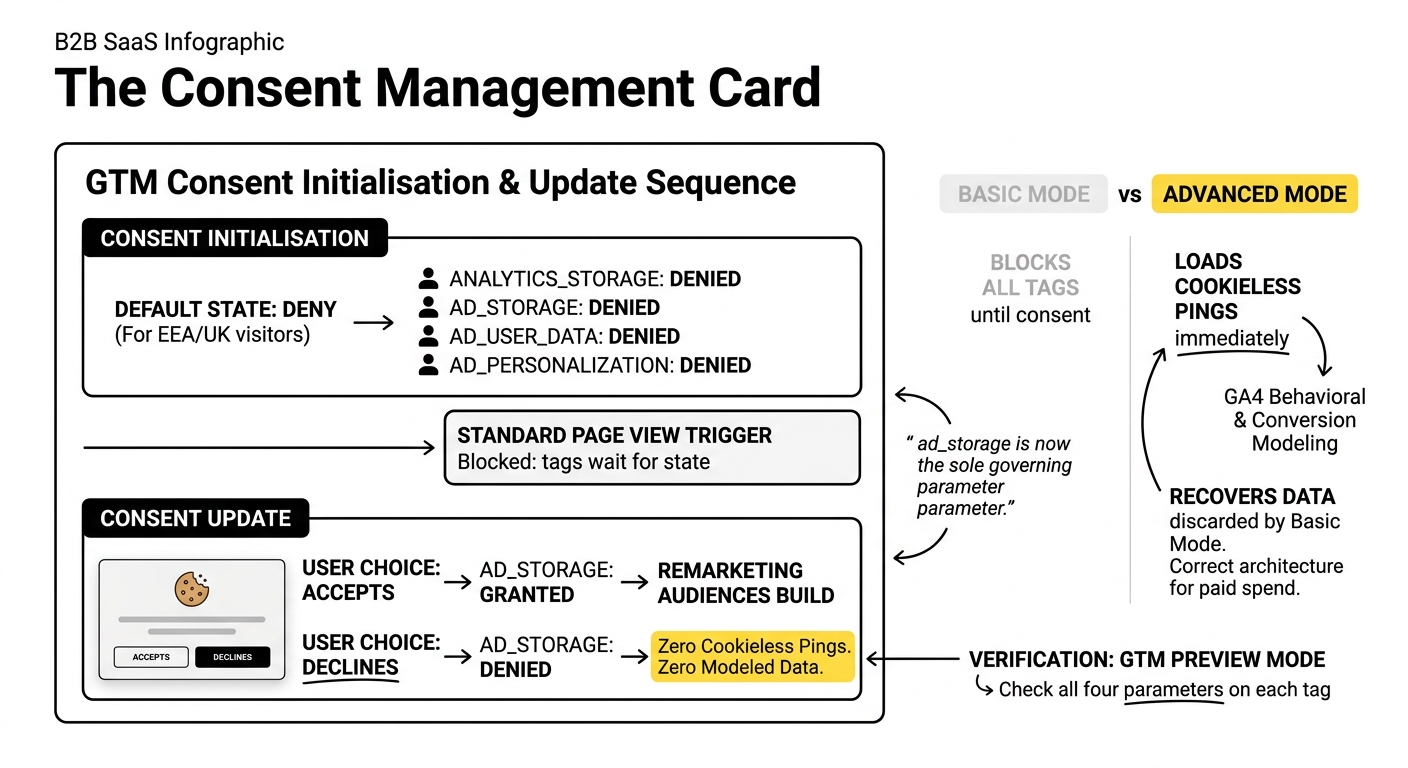
Google made Consent Mode v2 mandatory for EEA advertisers in March 2024. Enforcement tightened in July 2025, when non-compliant accounts lost access to remarketing, personalised advertising, and conversion modelling. A second structural change took effect in June 2026: Google Signals no longer governs advertising data in linked GA4 accounts. ad_storage is now the sole governing parameter for whether your GA4 data feeds Google Ads audience lists.
If your consent setup does not explicitly control ad_storage, your remarketing audiences are not building correctly right now.
The four consent signals you need to manage:
analytics_storage: controls whether GA4 can write cookies and collect user behaviour dataad_storage: governs cookie storage for advertising purposes, including Google Ads conversion trackingad_user_data: controls whether user data is sent to Google for advertising usead_personalization: governs remarketing and personalised ad features
All four must be configured. Consent Mode v1 handled only two. If your setup predates v2, it is incomplete.
Basic Mode vs Advanced Mode: the decision that affects your data volume
Basic Mode blocks all Google tags until the user accepts cookies. If they decline or ignore the banner, you collect nothing. Zero modelled data. Zero cookieless pings. For SaaS teams running paid campaigns to cold traffic, this is a significant data loss.
Advanced Mode loads tags immediately but fires cookieless pings when consent is denied. GA4 receives minimal signals that feed into behavioural and conversion modelling, recovering data that Basic Mode permanently discards. For advertisers spending meaningfully on Google Ads, Advanced Mode is the correct architecture.
The consent initialisation sequence in GTM:
The most common implementation error is firing the default consent state too late. The Consent Initialisation trigger in GTM fires before any standard page view trigger. Your default consent tag must use this trigger to ensure the denied state is set before GA4 or Google Ads tags can fire.
The correct default for EEA/UK visitors is to deny all four parameters. The Consent Update tag fires when the user makes a choice via the cookie banner, and grants or denies based on their selection.
Choosing a Consent Management Platform:
Your CMP must support all four v2 parameters and push updates to the GTM dataLayer in real time. Google-certified CMPs including Cookiebot, Usercentrics, OneTrust, and Complianz all support v2. For most SaaS teams at growth stage, Cookiebot or Complianz handles the implementation cleanly without enterprise-level overhead.
After any CMP implementation or GTM change, verify using GTM Preview Mode. Check the Consent tab on each tag to confirm all four parameters are present and updating correctly based on user choice.
Attribution Accuracy in a Consent-Aware Environment
This is where most teams compromise without realising it.
When consent is granted, GA4 tracks the full session with cookies. When consent is denied, GA4 falls back to behavioural modelling. The quality of that modelling depends on the volume of consented traffic you have: Google requires at least 700 ad clicks over seven days per country/domain pair before conversion modelling activates. For SaaS companies with lower traffic volumes or niche ICPs, this threshold matters.
Two mechanisms improve attribution accuracy alongside consent mode.
Enhanced Conversions hash and transmit first-party user data (email address, phone number) from your conversion forms to Google. This allows Google to match conversions to users who were logged into Chrome or YouTube even if they rejected cookies on your site. For SaaS with high-value demo requests or trial sign-ups where the user provides an email, Enhanced Conversions is a meaningful recovery mechanism.
Server-side GTM moves tag firing from the browser to a server container. This bypasses browser-level ad blockers and extends cookie lifespans beyond the 24-hour limit Safari imposes on client-side cookies. For SaaS teams with longer consideration cycles, where a prospect might return across multiple sessions over several weeks, this has a material impact on attribution. The implementation overhead is higher, but for accounts spending at meaningful scale, the data quality improvement typically justifies it.
For teams managing PPC alongside offline conversion data from CRM, the measurement complexity increases further. We cover GA4 offline conversion setup in detail in our article on GA4 offline conversion setup for SaaS PPC, GTM and CRM.
Parameter Management and Data Integrity
GA4 has event limits: 500 distinct event names per property, 50 custom parameters per event, and custom dimensions must be registered in the GA4 admin before they appear in reports. Exceeding the event limit is uncommon, but unregistered custom dimensions are a quiet failure mode: the data is being collected, but it is not showing up anywhere useful.
Establish a parameter registry. A simple shared document mapping each custom parameter name to its purpose, the events it appears on, and whether it has been registered as a custom dimension in GA4. This is maintenance overhead, but it is far less painful than diagnosing why a key parameter is missing from your exploration reports three months after launch.
Three parameter governance rules that prevent the most common data quality problems:
- Every parameter name must be in snake_case and must match exactly across GTM tags, GA4 custom dimensions, and any downstream export. A single capitalisation difference creates a separate dimension that fragments your data.
- Test in DebugView before publishing. GA4’s DebugView shows live events and parameters in real time. Every new event should be validated here before the GTM tag goes to production.
- Set your conversion counting method deliberately. For SaaS form submissions,
Once per sessionprevents a single user from inflating conversion counts if the thank-you page is refreshed. For purchase events in a PLG context,Once per eventis correct if you want to count each transaction.
Practical Takeaways
The teams that get reliable measurement are not the ones with the most sophisticated setups. They are the ones who made clear decisions early and documented them.
If you are starting or resetting your GA4/GTM foundation for SaaS PPC:
- Define your conversion event hierarchy before touching GTM. Know which events are key events and which are micro-conversions. Name them before implementing them.
- Audit your GTM container before adding to it. Remove stale tags, check for duplicate GA4 configuration tags, and document what remains.
- Implement Advanced Consent Mode, not Basic. Choose a Google-certified CMP and verify all four v2 parameters are firing correctly via GTM Preview Mode.
- Register all custom parameters as custom dimensions in GA4 before you start reporting on them.
- Layer in Enhanced Conversions if you are collecting first-party data at the point of conversion.
- Document everything. Event schema, parameter registry, CMP configuration, GTM container changes. Your future self, or the next person in this role, will need it.
If you have an existing setup that you are not confident in, the fastest diagnostic is a GTM audit against consent mode compliance, followed by a GA4 event audit to check for duplicate firing and unregistered dimensions. Those two checks will surface the majority of data quality problems.
If this is the kind of thing you would rather not work through alone, it is exactly the sort of setup we review with SaaS teams. Worth a conversation if you are at that point.
Frequently Asked Questions
How to integrate GA4 with GTM?
In Google Tag Manager, create a new tag and select the Google Tag type. Enter your GA4 Measurement ID, set the trigger to All Pages, and publish the container. From there, all additional GA4 event tags are fired through GTM by adding event tags with the relevant event names and parameters. Ensure your GA4 config tag fires before any event tags by checking the tag firing order in your container settings.
Do you need GTM for GA4?
No. GA4 can be implemented directly via the gtag.js snippet placed in your site’s HTML. But for SaaS teams managing multiple tags, custom events, and consent mode, GTM is strongly advisable. It centralises tag management, makes consent sequencing easier to control, and reduces the need for developer involvement every time a new event is added.
What are GTM best practices for SaaS PPC measurement?
Audit your container before adding new tags. Use consistent naming conventions that mirror your GA4 event schema. Implement consent initialisation before any GA4 or Google Ads tags can fire. Use GTM variables to pass UTM parameters and custom dimensions dynamically rather than hardcoding them. Document every tag with a clear name, purpose, and trigger, and review the container whenever a new tool is added to the stack.
How does GA4 improve PPC measurement compared to previous versions?
GA4 replaces session and goal-based tracking with an event-based model, meaning every user interaction can carry custom parameters that describe context. This makes it possible to segment conversion events by campaign, form location, or lead type in a way that Universal Analytics goals could not. GA4 also has native integration with consent mode modelling, which attempts to recover conversion data from users who declined tracking.
What are the key features of GA4 that support effective event tracking?
DebugView enables real-time validation of events and parameters before tags go live. Explorations allows custom analysis across any dimension or event combination. The Consent Overview in GA4 shows how consent signals are affecting your measurement. Custom dimensions and metrics let you register the parameters that matter for your business and surface them across standard reports.
How can consent management be integrated into GA4 and GTM?
Implement a Google-certified CMP that pushes all four v2 consent signals to the GTM dataLayer. In GTM, create a consent initialisation tag using the Consent Initialisation trigger to set default denied states before any Google tags fire. Add a consent update tag that reads the user’s CMP choice and updates consent state accordingly. Verify via GTM Preview Mode that the Consent tab on each tag shows the correct parameters updating based on user interaction.
What are common challenges in PPC measurement using GA4 and how can they be addressed?
The most common problems are duplicate GA4 configuration tags inflating event counts, missing or inconsistently named parameters that fragment reporting, consent setup that strips more data than necessary by using Basic rather than Advanced Mode, and custom dimensions registered after data collection starts, resulting in gaps in historical reporting. Each of these has a clear remediation: container audit, parameter registry, Advanced Consent Mode, and proactive dimension registration.
How to ensure data integrity and attribution accuracy in GA4?
Use snake_case naming consistently across GTM, GA4 custom dimensions, and any data exports. Register all custom parameters as custom dimensions before reporting on them. Validate every new event in DebugView before publishing. Set conversion counting methods deliberately, once per session for form submissions, once per event for transactions. Layer Enhanced Conversions for first-party data matching, and consider server-side GTM if your SaaS has longer consideration cycles where browser-based cookie limitations affect attribution.
What methodologies can be used for effective parameter management in GA4?
Build a parameter registry: a shared document mapping every custom parameter to its purpose, the events it appears on, its GA4 dimension registration status, and when it was last reviewed. Adopt a naming convention governance rule before implementation. Use GTM variables to populate parameters dynamically rather than hardcoding values into individual tags. This reduces the surface area for inconsistency and makes future audits tractable.
How to document tracking setups in GTM for better governance?
Maintain a tag inventory: a spreadsheet or shared doc with each tag’s name, the tool it serves, its trigger, the team member responsible, and the date it was last reviewed. Name GTM tags to mirror the GA4 event they fire, so the audit path is obvious. Log every container change with a description before publishing. For teams with multiple contributors, use GTM’s workspace and version history features to track who changed what and when.