Choosing the Right Offline Conversion Events for SaaS PPC Success
Which offline conversion events should SaaS PPC teams import into Google Ads, and which should they exclude? A practical guide to improving bid strategy and lead quality.

Your cost per lead looks reasonable. Platform metrics are healthy. Your sales team disagrees. That gap, the one between what Google Ads reports and what actually becomes pipeline, is not a budget problem or a creative problem. It is a conversion signal problem.
Smart Bidding is only as good as what you feed it. In B2B SaaS, where the average sales cycle runs 60 to 120 days and every deal moves through multiple qualification stages before it touches revenue, feeding the algorithm raw form fills is the same as asking it to optimise toward noise. The keyword that generated 40 form fills last month might have produced zero SQLs. Google Ads has no way to know that unless you tell it.
Offline conversion tracking for SaaS closes that loop. But which events you choose to import, and which you deliberately exclude, determines whether you are giving Smart Bidding better signal or just more of the same.
This article covers the decision framework SaaS PPC teams need to make those choices well.
What Offline Conversion Events Actually Are
An offline conversion event is any action that happens outside the browser session that started with an ad click. When a prospect submits a demo request form, that event is captured in Google Ads automatically. What happens next, the qualification call, the discovery, the SQL designation, the opportunity creation, the closed deal, happens in your CRM and is invisible to Google by default.
Offline conversion tracking creates a data bridge. At the point of initial form submission, your site captures a unique click identifier (the GCLID, or with Enhanced Conversions for Leads, a hashed email address). That identifier travels with the lead into your CRM. Each time the lead advances to a new stage, that stage is uploaded back to Google Ads with the original identifier attached. Google matches the upload to the original ad interaction and attributes the event correctly.
The result: Smart Bidding stops optimising for form fills and starts optimising for the pipeline stages that actually reflect qualified demand.
One important technical note for 2026: as of 15 June 2026, Google has migrated offline conversion imports to the Data Manager API. Custom integrations previously using the UploadClickConversions API method in the Google Ads API are now on a deprecated path. If your implementation was built before 2024 and has not been reviewed since, audit your setup before you do anything else.
Why the Selection Decision Matters More Than the Setup
Most guides on offline conversion tracking treat it as a technical configuration task. Get the GCLID captured, build the CRM sync, upload daily. That is the right foundation. But the more consequential decision is upstream: which events go into the “Conversions” column in Google Ads, and which sit as secondary or observation-only events?
This distinction matters because Smart Bidding takes its cue from whatever is designated as a primary conversion. Set five events as primary and Google’s algorithm will optimise toward a blended mix of all five, weighted by volume. If your newsletter signup fires 200 times per month and your SQL fires 15 times, you are not optimising toward SQLs. You are optimising toward newsletter signups that occasionally produce a sale.
The events you include in bidding define what your campaigns become. The events you exclude protect that definition.
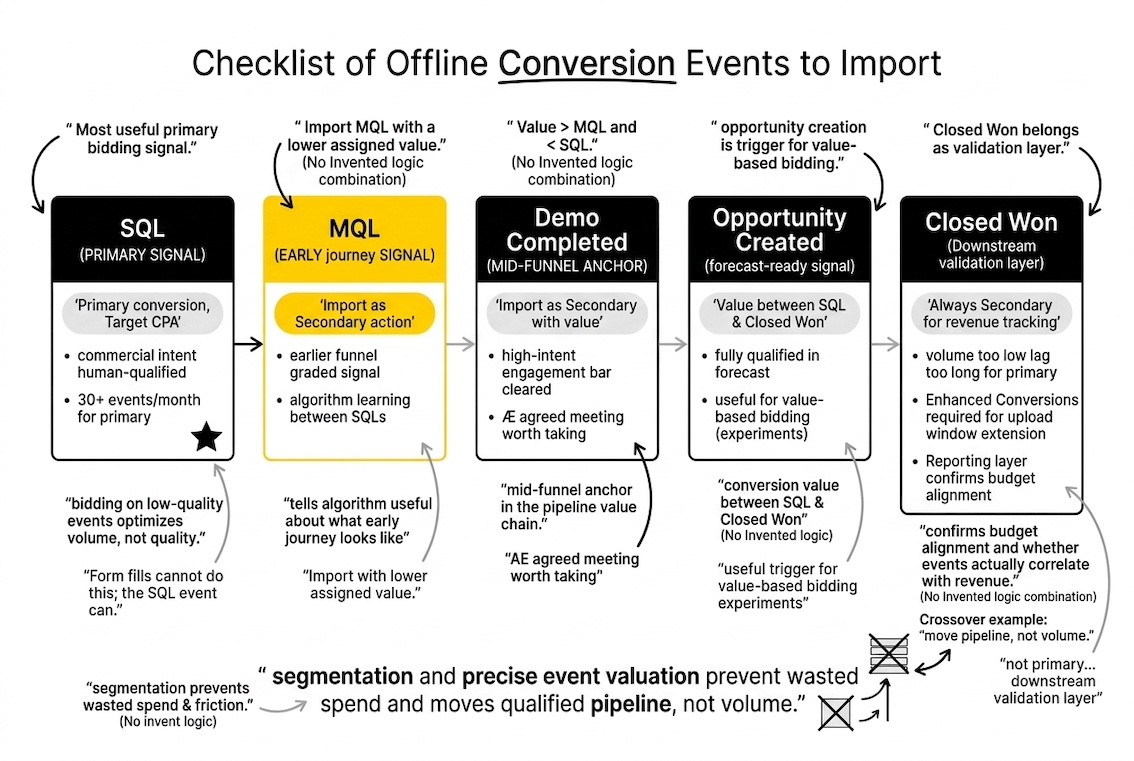
Offline Conversion Events SaaS PPC Teams Should Import
Sales Qualified Lead (SQL)
The SQL designation, typically triggered when sales accepts a lead in your CRM, is the most useful primary bidding signal for most B2B SaaS accounts. It reflects commercial intent that has cleared at least one human qualification gate. Form fills cannot do this; the SQL event can.
For accounts generating 30 or more offline conversions per month, making SQL the primary conversion event and switching to Target CPA bidding against it is the single highest-leverage change available in most accounts. Below 30 per month, Smart Bidding lacks enough signal to perform reliably; in that situation, keep SQL as secondary and continue building volume before making the switch.
Marketing Qualified Lead (MQL)
MQL events sit earlier in the funnel and carry weaker commercial signal on their own. Their value in an offline conversion setup is as a graded, early-stage signal that keeps the algorithm learning between SQL events.
In a 90-day sales cycle, waiting for SQLs alone means Google’s bidding AI receives new information roughly once per quarter per deal. MQL events fire earlier, within the GCLID upload window, and tell the algorithm something useful about what the early journey of a real buyer looks like. Import MQL as a secondary conversion action with a lower assigned value than SQL. Do not use it as a primary conversion unless you have strong evidence that your MQL definition is already filtering well.
Demo Completed or Discovery Call Held
For SaaS products with a structured demo-led sales process, a completed demo is a high-intent signal that sits between MQL and SQL in most funnels. It clears the engagement bar (the prospect showed up), it clears a basic qualification bar (the AE agreed the meeting was worth taking), and it fires reliably enough to provide volume.
Import this event as secondary, with a conversion value higher than MQL and lower than SQL. It gives Smart Bidding a mid-funnel anchor in the pipeline value chain.
Opportunity Created
If your CRM marks opportunity creation as a distinct stage, this is worth importing. An opportunity typically represents a deal that has cleared full qualification and entered the sales forecast. The conversion value should sit between SQL and Closed Won in your value hierarchy.
For enterprise SaaS accounts where deal sizes vary significantly, opportunity creation is also a useful trigger for value-based bidding experiments, because the ACV estimate is often attached to the record at this stage.
Closed Won
Closed Won is the cleanest signal and the hardest to use. For most B2B SaaS sales cycles running 60 days or longer, the closed deal falls outside the 90-day GCLID upload window, which means standard GCLID-based imports are rejected for many of your actual customers.
The solution is to layer Enhanced Conversions for Leads on top of your standard import. Enhanced Conversions matches on hashed email rather than GCLID, so the 90-day time constraint on the original click does not apply. With this in place, Closed Won events can flow into Google Ads even when the deal closed well after the click expired.
Closed Won should always be a secondary conversion, not a primary. Its volume is too low and its lag too long for Smart Bidding to use it as a real-time optimisation signal. It belongs in your reporting as a downstream validation layer, confirming whether the events you are bidding on actually correlate with revenue.
Offline Conversion Events SaaS PPC Teams Should Exclude from Bidding
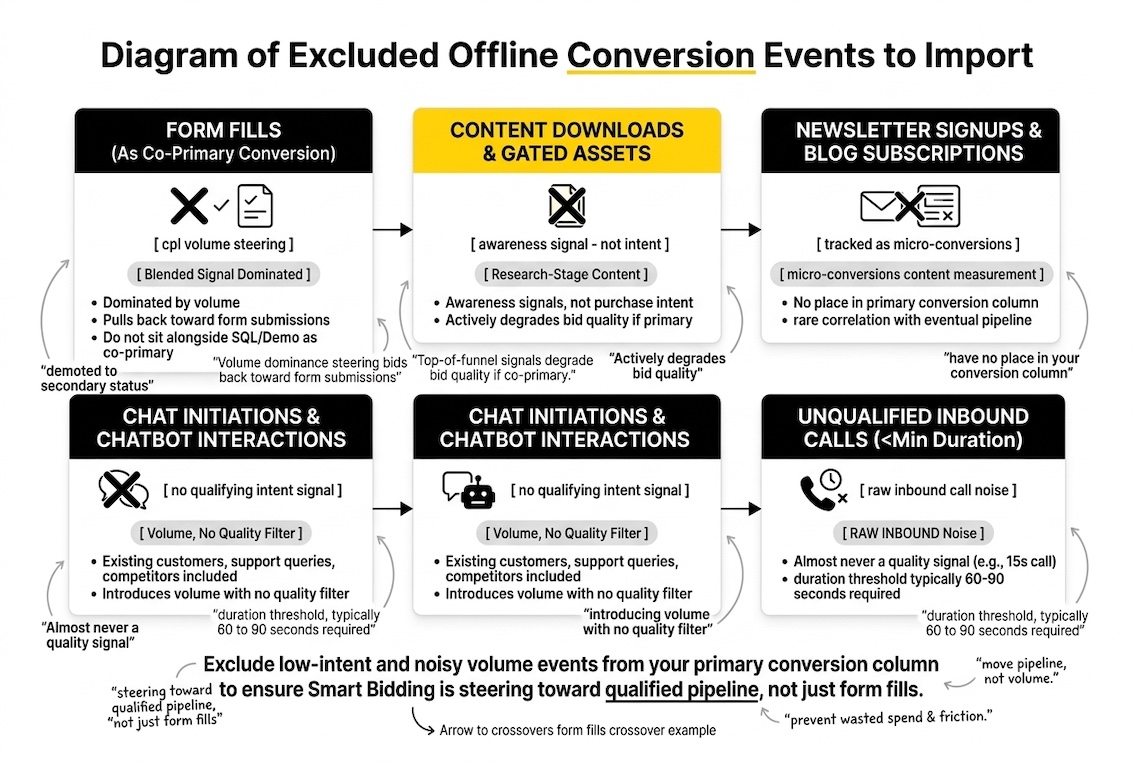
Identifying what not to import into your primary conversion column is as important as identifying what to include.
Form Fills as a Primary Conversion (Alongside Offline Events)
Once you have offline conversions running, the form fill should be demoted from primary to secondary status. It should not sit alongside SQL or Demo Completed as a co-primary conversion. Its volume will dominate the blended signal and pull Smart Bidding back toward optimising for form submissions.
Keep the form fill as a secondary conversion for monitoring. It is useful to know how many form fills are generating at the top of the funnel. It should not be steering your bids.
Content Downloads and Gated Asset Requests
Whitepapers, templates, benchmark reports. These are top-of-funnel awareness signals, not purchase intent signals. For some SaaS categories, the overlap between research-stage content downloaders and genuine buyers is low enough that importing these events as primary conversions actively degrades bid quality.
If you are running awareness or demand generation campaigns specifically designed to drive content engagement, importing downloads as secondary conversions within those campaigns can provide useful directional data. Do not bleed that signal into your demand capture campaigns.
Newsletter Signups and Blog Subscriptions
These events should be tracked as micro-conversions in GA4 for content measurement purposes. They have no place in your Google Ads conversion column in any capacity unless your CRM data shows a meaningful correlation between newsletter subscription and eventual pipeline, which is rare in B2B SaaS.
Chat Initiations and Chatbot Interactions
A chat initiation means someone opened a widget. It does not mean they had a qualifying intent signal. Bot interactions are particularly noisy: in most SaaS accounts, a significant portion of chat traffic consists of existing customers, support queries, and competitors. Including these in your conversion column introduces volume with no quality filter.
If your chatbot collects enough structured information to qualify a lead (company size, job title, specific product interest), you might consider importing chatbot-qualified leads as an offline event. The chat initiation itself is not the event worth importing.
Unqualified Inbound Calls Under a Minimum Duration
Call tracking is valuable, but raw inbound calls contain too much noise for most SaaS accounts to use as a primary conversion. A 15-second call is almost never a quality signal. If you are tracking phone conversions, set a minimum duration threshold (typically 60 to 90 seconds) and, where possible, layer on a qualification outcome from your CRM before including calls in your primary conversion column.
How to Structure Conversion Events for Smart Bidding
The most effective setup for a B2B SaaS account is a graded value hierarchy across separate conversion actions, each with a different assigned value and a different designation (primary or secondary).
A practical structure looks like this:
EventValue (relative)DesignationPurposeMQLLow (e.g. 20% of SQL value)SecondaryEarly signal; keeps algorithm learningDemo CompletedMedium (e.g. 60% of SQL value)SecondaryMid-funnel anchorSQLHigh (baseline)PrimaryBidding targetOpportunity CreatedHigher (e.g. 150% of SQL value)SecondaryPipeline validationClosed WonActual ACVSecondaryDownstream reporting
Smart Bidding will weight Closed Won most heavily due to value, but because it sits as secondary, it informs the algorithm without steering it. SQL, with consistent daily upload volume and primary designation, handles the steering.
One operational note: set up each stage as a separate conversion action in Google Ads, not as value adjustments to a single action. Separate actions allow you to segment performance in your dashboard, see funnel progression, and troubleshoot upload issues by stage without affecting other events.
The 90-Day Window Problem and How to Work Around It
Google Ads only accepts GCLID-based offline conversion uploads if the original click happened within the last 90 days. For SaaS products with longer enterprise sales cycles, this creates a real attribution gap. Deals that close in month four or five are often rejected outright.
There are two practical solutions.
First, layer Enhanced Conversions for Leads. This matches on hashed email rather than GCLID and is not bound by the 90-day window. The requirement is that you capture an email address at form submission (standard for most SaaS lead forms) and store it against the lead record in your CRM. With Enhanced Conversions running alongside standard GCLID import, you recover a substantial portion of the closed deals that would otherwise be rejected.
Second, import mid-funnel events that fire within the 90-day window even when the deal itself does not. If your average sales cycle is 120 days but your MQL and SQL designations typically happen within 45 days of the original click, those events still upload successfully. Smart Bidding gets the quality signal from the early pipeline stages even if the final revenue event falls outside its window. This is the fundamental reason for importing multiple events rather than waiting for Closed Won alone.
For a deeper look at the GTM and CRM setup that underpins this measurement layer, the technical configuration process is covered in detail as part of the GA4 and GTM measurement foundations for SaaS PPC.
Tracking Effectiveness: What to Monitor After Setup
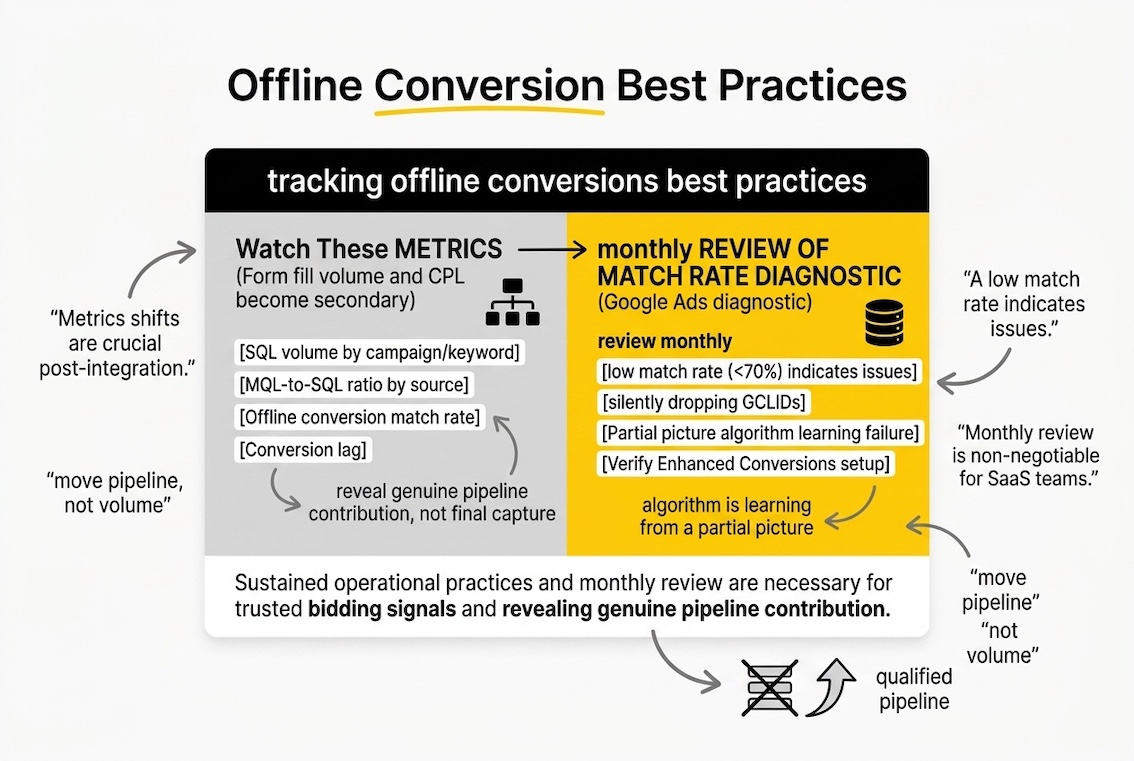
Once offline conversions are running, the metrics that matter change. Form fill volume and CPL become secondary reporting metrics. The numbers to watch are:
- SQL volume by campaign and keyword: which traffic sources are actually qualifying?
- MQL-to-SQL ratio by source: are some channels generating MQLs that never progress?
- Offline conversion match rate: what percentage of uploaded events are being matched back to a click? A low match rate (below 70%) usually indicates GCLID capture issues or a CRM sync delay.
- Conversion lag: how long between click and the primary conversion event? This informs your conversion window setting and your reporting period.
The match rate metric in particular is worth reviewing monthly. If your CRM integration is silently dropping GCLIDs, or Enhanced Conversions is not returning matches because email addresses are not being captured at form submission, the algorithm is learning from a partial picture. You cannot see that in impression or click data. You see it in the match rate diagnostic in Google Ads.
For a framework connecting these signals back to your broader SaaS analytics and attribution setup, that is where the measurement architecture lives.
Frequently Asked Questions
What are offline conversion events and why are they important for SaaS PPC campaigns?
Offline conversion events are sales pipeline actions that happen outside the browser, in your CRM, over the phone, or in a sales call, and are imported back into Google Ads after the fact. They matter for SaaS PPC because the form fill (the default online conversion) is a poor proxy for pipeline quality. Importing downstream events like SQL or demo completion gives Smart Bidding accurate signal about which clicks produce real buyers, not just form submissions.
How can offline conversion events improve measurement accuracy in B2B marketing?
Standard Google Ads tracking only records what happens on-site. For B2B SaaS, the commercially significant events happen in your CRM, often weeks or months after the original click. Offline conversion imports reconnect those CRM events to the original ad interaction, so your reporting reflects actual pipeline progression rather than top-of-funnel proxy metrics.
What criteria should SaaS PPC teams use to select relevant offline conversion events?
The core criteria are: does this event reflect genuine purchase intent (not just engagement), does it fire with enough volume to give Smart Bidding useful signal, and does it fall within the 90-day GCLID upload window? Events that fail on volume (fewer than 30 per month per campaign) or that happen too late in a long sales cycle are better handled as secondary conversions rather than primary bidding targets.
Which offline conversion events should be excluded to optimise PPC performance?
Form fills should be demoted from primary once offline events are running. Content downloads, newsletter signups, raw chat initiations, and short inbound calls should not be included as primary conversions. These events add volume without adding quality signal, and Smart Bidding will optimise toward the cheapest event in the mix.
How do offline conversion events impact bid strategies for SaaS companies?
They enable a fundamental shift from optimising toward form fills to optimising toward sales-qualified pipeline. With 30 or more SQLs per month flowing into Google Ads, Target CPA bidding against the SQL event becomes viable. With ACV data attached to Opportunity or Closed Won events, Target ROAS bidding toward actual revenue becomes possible. Neither strategy works well without offline conversion data behind it.
What are the best practices for importing offline conversion events into Google Ads?
Upload daily, not weekly. Create separate conversion actions for each pipeline stage rather than adjusting values on a single action. Use Enhanced Conversions for Leads alongside standard GCLID import to extend attribution coverage. Set all offline conversion actions to secondary initially and only promote SQL to primary once you have validated the match rate and confirmed volume is sufficient.
How can marketers track the effectiveness of offline conversion events in their campaigns?
Monitor the match rate in Google Ads diagnostics (target above 70%), track SQL volume by keyword and campaign, compare MQL-to-SQL ratio by traffic source, and review conversion lag to ensure your conversion window settings reflect your actual sales cycle. Closed Won events, even as secondary conversions, give you downstream validation of whether your primary bidding target correlates with revenue.
What challenges do SaaS PPC teams face when managing offline conversion events?
The most common issues are GCLID not being captured on the landing page form, CRM sync delays causing upload lags, events landing outside the 90-day GCLID window for longer sales cycles, and inadvertently including low-quality events in the primary conversion column alongside high-quality ones. The technical resolution for most of these involves Enhanced Conversions for Leads plus daily automated uploads via Data Manager.
How can offline conversion events enhance data-driven decision-making for PPC teams?
When your Google Ads reporting reflects SQL and opportunity data rather than form fill volume, the decisions that follow, budget allocation, keyword investment, campaign structure, become grounded in pipeline signal rather than activity metrics. Keyword-level SQL data, for example, makes it possible to identify terms that look expensive on a CPL basis but produce high-quality pipeline, and terms that look cheap but never qualify.
What tools or platforms can assist in managing offline conversion events for PPC campaigns?
HubSpot and Salesforce both have native integrations with Google Ads for offline conversion import. Zapier and Make can automate uploads for teams using other CRMs. Google’s own Data Manager (the current recommended path) supports SFTP uploads for CSV-based workflows. For teams needing more control over value assignment and deduplication logic, custom integrations via the Data Manager API give full flexibility over what gets uploaded, when, and at what value.
If you are working through offline conversion setup for a SaaS account, or reviewing an existing integration that may be on the legacy path, we are happy to take a look at how your current conversion architecture maps to your actual sales funnel. It is the kind of thing we dig into regularly.