A Practical Guide to Integrating Salesforce or HubSpot with SaaS PPC for Closed-Won Reporting
Discover how to integrate Salesforce or HubSpot with SaaS PPC for accurate closed-won reporting and improved measurement.

Your PPC platform says the campaign is performing well. Your CRM tells a different story. Three months of spend, a healthy volume of form fills, and the sales team is asking where the pipeline actually came from.
This is not a reporting problem. It is an integration problem. And it is one of the most common gaps in SaaS marketing operations.
When Salesforce or HubSpot is not properly connected to your ad platforms, you are making budget decisions based on incomplete data. You are optimising campaigns towards form submissions that may never become qualified pipeline, let alone closed-won revenue. The integration between your CRM and your PPC platforms is what closes that loop. It is also what transforms your reporting from a vanity exercise into something your finance director would trust.
This guide covers the mechanics of connecting Salesforce or HubSpot with SaaS PPC for closed-won reporting: what the integration actually does, how to implement it, and the data quality and governance considerations that determine whether it works reliably.
Why Closed-Won Reporting Changes How You Optimise PPC
Most SaaS PPC accounts are still optimising towards lead volume. The campaigns are structured to drive form fills or demo requests, and the platform’s bidding algorithm is trained on that signal.
The problem is that form fills are a weak proxy for revenue, especially in B2B SaaS with multi-stakeholder buying committees and sales cycles measured in weeks or months. A keyword that drives high-volume form submissions from the wrong ICP is costing you budget and confusing your Smart Bidding model at the same time.
Closed-won reporting solves this by feeding revenue data back to the ad platform. When a deal closes in Salesforce or HubSpot, that conversion event is imported into Google Ads (or LinkedIn, depending on your channel mix) along with the original click identifier. Google now knows which keyword, which ad, and which campaign led to actual revenue, and can adjust bidding accordingly.
This is the feedback loop that separates a PPC programme tied to business outcomes from one tied to a form submission count.
For a broader look at how this fits into marketing analytics for SaaS, the measurement architecture matters as much as any individual campaign setting.
.jpeg)
How the Integration Works: The GCLID Chain
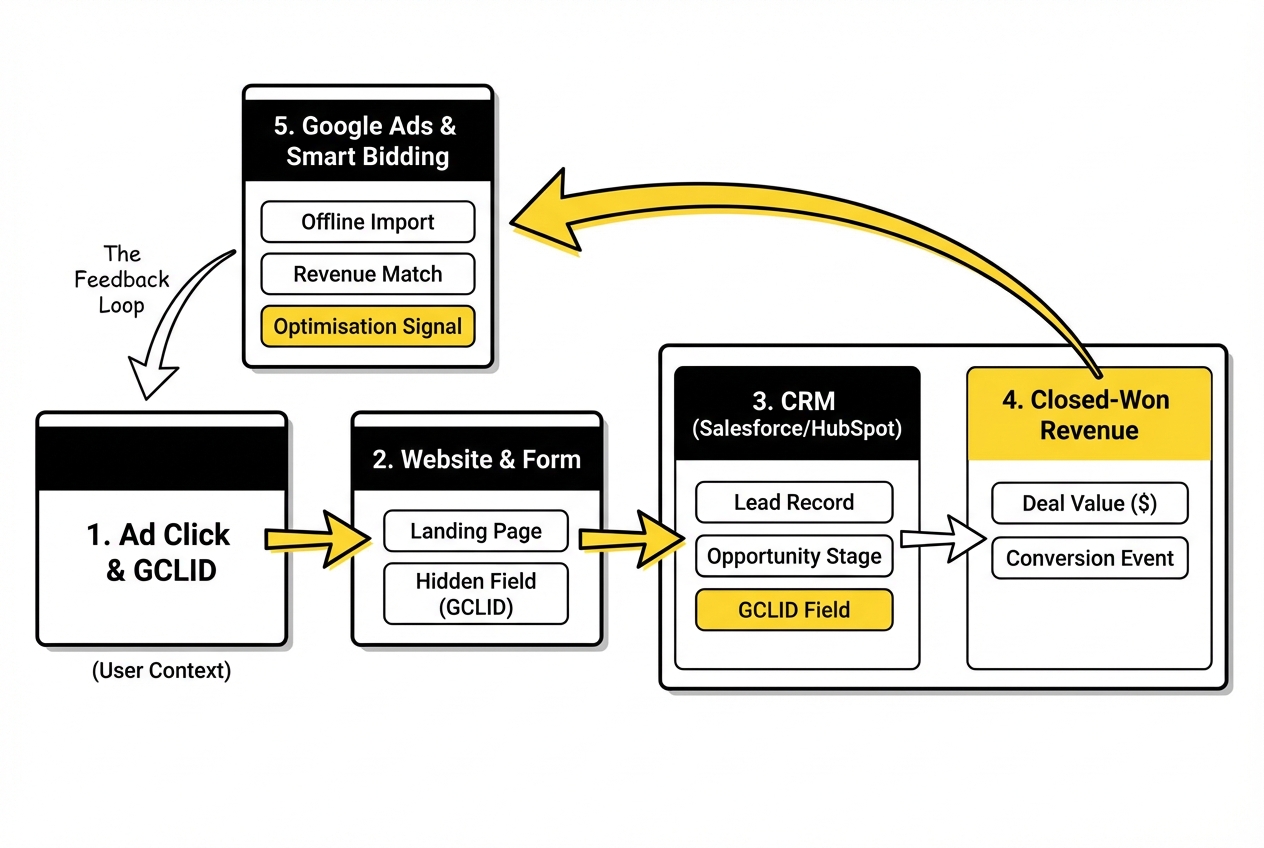
The technical foundation of closed-won reporting is the Google Click Identifier (GCLID). When someone clicks a Google Ad, Google appends a unique identifier to the URL. That identifier needs to be captured at the point of form submission and stored against the contact or lead record in your CRM.
The chain looks like this:
- A prospect clicks your ad. The GCLID is appended to the landing page URL.
- Your website captures the GCLID (via a hidden form field or cookie) and passes it into Salesforce or HubSpot when the form is submitted.
- The lead progresses through the pipeline. When the deal closes, the CRM triggers an export of the closed-won event, including the original GCLID.
- That data is imported into Google Ads via the Data Manager or API. Google matches the GCLID to the original click and records it as an offline conversion.
- Smart Bidding can now optimise towards keywords and audiences that correlate with actual closed-won revenue, not just top-of-funnel submissions.
It is worth noting that Google retired its legacy Salesforce integration in May 2025. Both Salesforce and HubSpot now connect through Google Ads Data Manager, which uses a point-and-click interface for setting up and scheduling automated imports. If your account is still on the legacy configuration, migrating to Data Manager is a prerequisite before anything else.
One important constraint: the GCLID is retained by Google for 90 days. If your average sales cycle runs longer than that, you need to import a meaningful conversion event that occurs within the 90-day window. For most SaaS teams, this means importing a pipeline milestone (a qualified opportunity or a demo booked) within the window, and then importing the closed-won event separately. The bidding algorithm benefits from both signals.
Salesforce vs HubSpot: What Is Different in Practice
The underlying mechanics are the same for both platforms. The practical differences come down to where the GCLID is stored, how conversion events are triggered, and what middleware you may need.
Salesforce
The GCLID needs to be stored as a custom field on the Lead or Opportunity object. Most Salesforce implementations require a small configuration to create this field and map it from the web form. Once the field is in place, a workflow rule or Process Builder automation can trigger the export of closed-won events to Google Ads Data Manager when the Opportunity Stage changes to “Closed Won.”
The native Salesforce-to-Google Ads connection through Data Manager supports GCLID matching and, in enhanced mode, user-provided data like hashed email addresses. The enhanced approach improves match rates, particularly where cookies are cleared or users switch devices across a long sales cycle.
HubSpot
HubSpot stores the GCLID as a contact property, and its native Google Ads integration is more straightforward to configure. The connection is enabled within HubSpot’s Ads settings, and deal stage changes can be mapped to conversion events that sync automatically to Google Ads.
HubSpot’s advantage here is that it natively captures UTM parameters and ad click data for contacts, which reduces the configuration burden compared to a Salesforce build. The trade-off is that HubSpot’s CRM data model is less flexible for complex multi-stakeholder deal structures common in mid-market SaaS.
For LinkedIn Ads, both platforms support audience syncing and conversion imports, though the LinkedIn click ID requires separate handling.
Implementation Steps for Closed-Won Reporting
This is the core process for getting the integration live. The exact steps will vary depending on your CRM configuration and whether you are using native integrations or a middleware layer.
Step 1: Audit your GCLID capture
Before connecting anything, confirm that GCLIDs are being captured consistently at the point of form submission and stored in your CRM. Check a sample of recent form fills and verify the field is populated. If GCLID capture is inconsistent or absent, this is the first thing to fix. Every other step depends on it.
Step 2: Create a custom GCLID field in your CRM
In Salesforce, create a custom text field on the Lead and Opportunity objects and map it from your form submissions. In HubSpot, this is typically handled by the native Google Ads integration, but confirm the “Google Ad Click ID” contact property is being populated on recent submissions.
Step 3: Define your conversion events
Decide which CRM milestones you will import as conversion events. At minimum, this should include Closed Won. For longer sales cycles, consider also importing Opportunity Created or Demo Completed as upstream signals. Assign conversion values where possible, such as ACV or weighted deal value, to enable value-based bidding.
Step 4: Connect via Google Ads Data Manager
Navigate to Tools in your Google Ads account and open Data Manager. Connect Salesforce or HubSpot as a data source. Set the import to run on a scheduled basis, daily at minimum. Weekly uploads are insufficient for Smart Bidding to make timely adjustments.
Step 5: Enable enhanced conversions for leads
If you are not already using Enhanced Conversions for Leads, enable it alongside the offline import. This supplements GCLIDs with hashed first-party data (email, phone number) collected at form submission. According to Google Ads data, advertisers using first-party data alongside GCLIDs see a median 10% increase in matched conversions compared to GCLID-only imports. This matters in SaaS where multi-week sales cycles and cross-device journeys erode match rates.
Step 6: Verify the import
After the first scheduled import runs, check the Conversions section in Google Ads to confirm events are appearing. Allow up to three hours for imported data to show. Check for upload errors in Data Manager, particularly around GCLIDs that fall outside the 90-day window or mismatched conversion action names.
.jpeg)
Data Quality and Governance: The Part Most Teams Get Wrong
A CRM-to-PPC integration is only as reliable as the data flowing through it. Data quality management is not a one-time implementation task. It requires ongoing governance.
The most common failure points:
- Incomplete GCLID capture. If your forms are not capturing GCLIDs consistently, your matched conversion rate will be low and your bidding signals will be unreliable. This often happens when forms are hosted on third-party platforms that do not pass URL parameters to the hidden field, or when cookie consent banners interrupt the GCLID storage process.
- CRM field hygiene. If the GCLID field is not required or validated, it will accumulate blank records. When those leads convert, there is nothing to match. Enforce GCLID capture at the form level rather than relying on manual entry downstream.
- Opportunistic attribution. In multi-touch attribution models, the same closed-won deal may carry touchpoints from organic, paid search, LinkedIn, and direct. If you are importing closed-won events from your CRM without specifying which touchpoints contributed, you risk overcounting conversions in the ad platform. Define clearly which touchpoints are eligible to receive credit before configuring the import.
- Stale configurations. CRM field names change. Workflow rules get modified. A working integration in January can silently break in March after a Salesforce admin updates an Opportunity stage name that your Data Manager connection depended on. Set up a monthly check on upload success rates in Data Manager to catch silent failures early.
Data integrity and governance in multi-touch attribution models is a topic that deserves its own treatment. The integration configuration is the starting point, not the destination.
Common Pitfalls to Avoid
Optimising too early. Smart Bidding needs sufficient conversion volume before it can perform reliably. Google recommends 30 to 50 conversion events per month per campaign before switching to a value-based bidding strategy. If your closed-won volume is low, import upstream pipeline milestones as additional signals while you build history.
Treating the 90-day GCLID window as a hard limit on reporting. The window applies to what Google can match, not to your own analysis. You can still report on closed-won revenue attributed to PPC by querying your CRM directly. Many SaaS marketing operations teams maintain a separate reporting layer (a BI tool or a dedicated marketing analytics for SaaS dashboard) that joins CRM data with ad spend data outside the ad platform. This gives you attribution data across the full sales cycle regardless of the GCLID window. When and How to Scale SaaS PPC Spend Without Blowing Up CAC, also on this blog, takes this further.
Conflating correlation with attribution. When closed-won data flows back to Google Ads, the platform will surface keywords and campaigns that correlate with revenue. That correlation is useful for bidding. It is not the same as a rigorous multi-touch attribution model. The integration improves optimisation. It does not resolve attribution entirely.
Neglecting LinkedIn. Most SaaS PPC programmes run on both Google Ads and LinkedIn. The GCLID-based approach applies to Google. LinkedIn uses its own click identifier and has a separate conversion API. If you are only configuring closed-won imports for Google Ads, you are getting a partial picture.
Frequently Asked Questions
What are the benefits of integrating Salesforce or HubSpot with SaaS PPC platforms?
The primary benefit is that your ad platform’s bidding algorithm can optimise towards revenue rather than form submissions. This improves campaign efficiency over time, reduces spend on keywords that drive low-quality leads, and gives you reporting that holds up when the CFO asks what PPC actually contributed to closed-won pipeline. Secondary benefits include the ability to build CRM-based audiences for exclusion and retargeting.
How can closed-won reporting improve marketing effectiveness in SaaS businesses?
Closed-won reporting connects spend to revenue at the campaign and keyword level. It reveals which segments, keywords, and ad types correlate with deals that actually close, rather than those that generate volume. Over time, this shifts budget allocation towards the traffic that converts through the full funnel, not just to a form.
What challenges do Marketing Operations Specialists face when integrating CRM with PPC platforms?
The most common challenges are inconsistent GCLID capture at the form level, CRM field configurations that do not pass clean data downstream, and maintaining the integration over time as CRM configurations evolve. Data governance is the ongoing challenge: the integration requires active monitoring, not just a one-time setup.
How does data integrity impact multi-touch attribution models in SaaS?
B2B SaaS buyers interact with multiple channels before a deal closes. If your CRM data is incomplete or poorly structured, multi-touch attribution models cannot accurately distribute credit across those touchpoints. The result is attribution that overstates the contribution of whichever channel happens to have the cleanest data. Data integrity upstream (consistent field capture, clean stage definitions, complete GCLID records) is what makes attribution models directionally reliable.
What steps are involved in implementing Salesforce or HubSpot integration with PPC for closed-won reporting?
Audit GCLID capture on your current forms, create or verify the GCLID custom field in your CRM, define which deal stages map to conversion events, connect your CRM to Google Ads via Data Manager, enable Enhanced Conversions for Leads, and set up a scheduled daily import. Then verify the first import run, check for errors, and establish a recurring review of upload success rates.
What are common pitfalls to avoid during CRM and PPC integration?
The most common are: missing GCLID capture on forms hosted outside your primary CMS, CRM field changes that silently break the integration, attempting to run value-based bidding before enough conversion volume exists, and not accounting for the 90-day GCLID window when sales cycles are long.
How can seamless CRM-ad platform integrations enhance reporting accuracy?
By eliminating the manual export and reconciliation layer. When closed-won data flows automatically from your CRM to your ad platform, you remove the opportunity for human error in data handling and ensure reporting reflects actual deal outcomes rather than a manual attribution exercise done at month-end.
What role does data governance play in effective closed-won reporting?
Governance determines whether the integration is reliable over weeks and months, not just at launch. This means enforcing GCLID capture as a required field, auditing import success rates regularly, maintaining clear documentation of which CRM fields map to which conversion events, and assigning ownership for the integration so that CRM changes are communicated before they break the connection.
How can tech-savvy Marketing Operations Specialists streamline their reporting processes?
Automate the conversion import on a daily schedule rather than relying on manual uploads. Build a BI layer that joins CRM deal data with ad platform cost data directly, independent of the ad platform’s attribution model. This gives you a full-cycle view that is not constrained by GCLID windows or platform attribution logic.
What actionable insights can help overcome data silos in SaaS marketing?
Start with a GCLID audit across all active forms and landing pages. Establish a single source of truth for which CRM pipeline stage maps to each PPC conversion event. Use Enhanced Conversions for Leads to supplement GCLID matching with hashed email data. And treat the integration as a system to be maintained, not a project to be completed.
If you are working through this setup and want a second opinion on your current configuration, we are happy to take a look. This is the kind of integration we work through with SaaS teams regularly, and the details matter more than most guides suggest.
.png)