When GA4, GTM, and CRM Need to Work Together for SaaS Success
How agency support helps SaaS marketing ops teams align GA4, GTM, and CRM: from event hygiene and GTM governance to offline conversions and consent.

Your GA4 numbers look healthy. Your CRM tells a different story. And when the paid media team asks why their pipeline contribution has dropped, no one can agree on a figure because GA4, Google Tag Manager, and the CRM are each measuring something slightly different.
This is not a rare problem. It is the default state for most SaaS marketing operations teams at any meaningful scale.
The challenge is not that these tools cannot work together. GA4 can receive offline conversion data from your CRM. GTM can manage your entire tracking layer with version control and access permissions. The attribution model in GA4 can weight multi-touch journeys across long sales cycles. But getting all three to function as a coherent system requires consistent decisions at the implementation level, governance that holds across team changes, and ongoing maintenance that does not fall apart every time a developer merges a new release.
This is where the question of SaaS GA4 attribution service support becomes relevant, not as a replacement for internal capability, but as the operational layer that keeps the system honest.
Why SaaS Attribution Is Harder Than It Looks
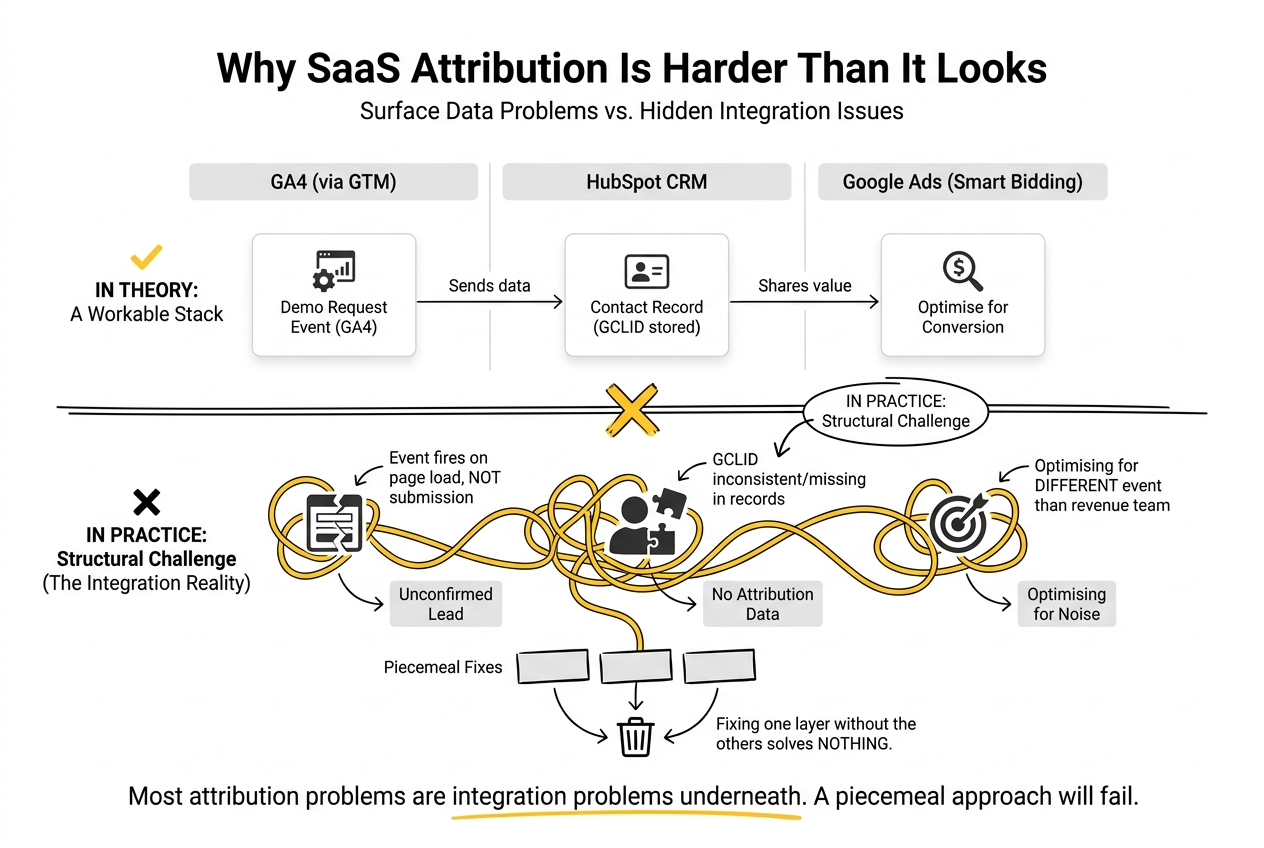
Most attribution problems in SaaS look like data problems on the surface. They are usually integration problems underneath.
A Series B analytics platform might have GA4 deployed via GTM, HubSpot as the CRM, and Google Ads running smart bidding against GA4 conversion events. In theory, this is a workable stack. In practice, the demo request event fires on page load rather than on confirmed submission. The GCLID is not being stored in HubSpot contact records consistently. The conversion event being optimised in Google Ads is not the same event the revenue team uses to define a qualified lead in the CRM. Three platforms, three interpretations of the same user action.
Fixing one layer without the others solves nothing. That is the structural challenge of integrating GA4 with CRM and GTM in a SaaS environment, and it is also why piecemeal fixes rarely hold.
Event Hygiene: The Foundation Everything Else Depends On
Poor event hygiene is the most common and most underestimated source of attribution errors in SaaS GA4 setups.
Event hygiene covers the naming, triggering logic, parameters, and consistency of the events you send to GA4. When it breaks down, the consequences compound. A form submission event that fires on page load rather than after server confirmation inflates conversion counts and poisons the paid media optimisation signals Google Ads uses for smart bidding. A GTM trigger that fires on all clicks on a page rather than a specific button inflates engagement data across reports. An event named “demo_request” in one sprint and “demo_form_submit” in the next creates two separate events in GA4, neither of which tells the complete story.
For marketing ops leaders, the daily consequence is the reconciliation burden. Time spent in reporting cycles trying to explain discrepancies between GA4 and the CRM is time not spent on analysis or improvement.
Marketing operations GA4 best practices around event hygiene start with a clear decision-making framework: events should only be created if they map to a specific business action, follow a consistent naming convention, carry the parameters needed for downstream segmentation, and have a documented owner responsible for validating them after each site release.
Custom event tags deployed through GTM are the right mechanism here. Unlike in-platform events created in the GA4 interface, custom tags in GTM are proactive. They define what gets sent to GA4 rather than manipulating data after it has already arrived. They attach context at the point of capture, such as form type, funnel stage, or business unit, making them far more reliable for attribution analysis downstream.
GTM Governance: Who Owns the Container?
A GA4 event taxonomy is only as durable as the GTM container governance around it.
GTM governance is the practice of controlling who can publish changes to the container, how changes are documented, and how they are validated before going live. Without it, a container that starts clean degrades quickly. Tags accumulate without documentation. Triggers fire in ways no one can explain. A developer testing a new checkout flow publishes a container update that inadvertently breaks a conversion event, and no one notices until revenue reporting looks wrong three weeks later.
GTM provides the infrastructure for proper governance: version history, a preview and debug mode, access controls that separate editors from publishers, and workspace environments for staging changes before they affect production. Most SaaS teams have access to all of this and use very little of it.
The governance failure is usually a people and process problem, not a platform limitation. There is no single owner for the container, no required documentation for releases, and no post-publish validation step. In fast-moving product teams, this is an easy thing to deprioritise until it causes a material problem.
An agency working on SaaS GA4 attribution strategies should hold this layer as rigorously as they hold the event taxonomy. It means requiring a note on every container version, running a structured validation checklist after each release, and maintaining a tagging specification that the internal team can reference independently. The container should be legible to anyone who needs to work in it, not just the people who built it.
Offline Conversions and the CRM Gap
In B2B SaaS, the conversion that matters most rarely happens in the browser.
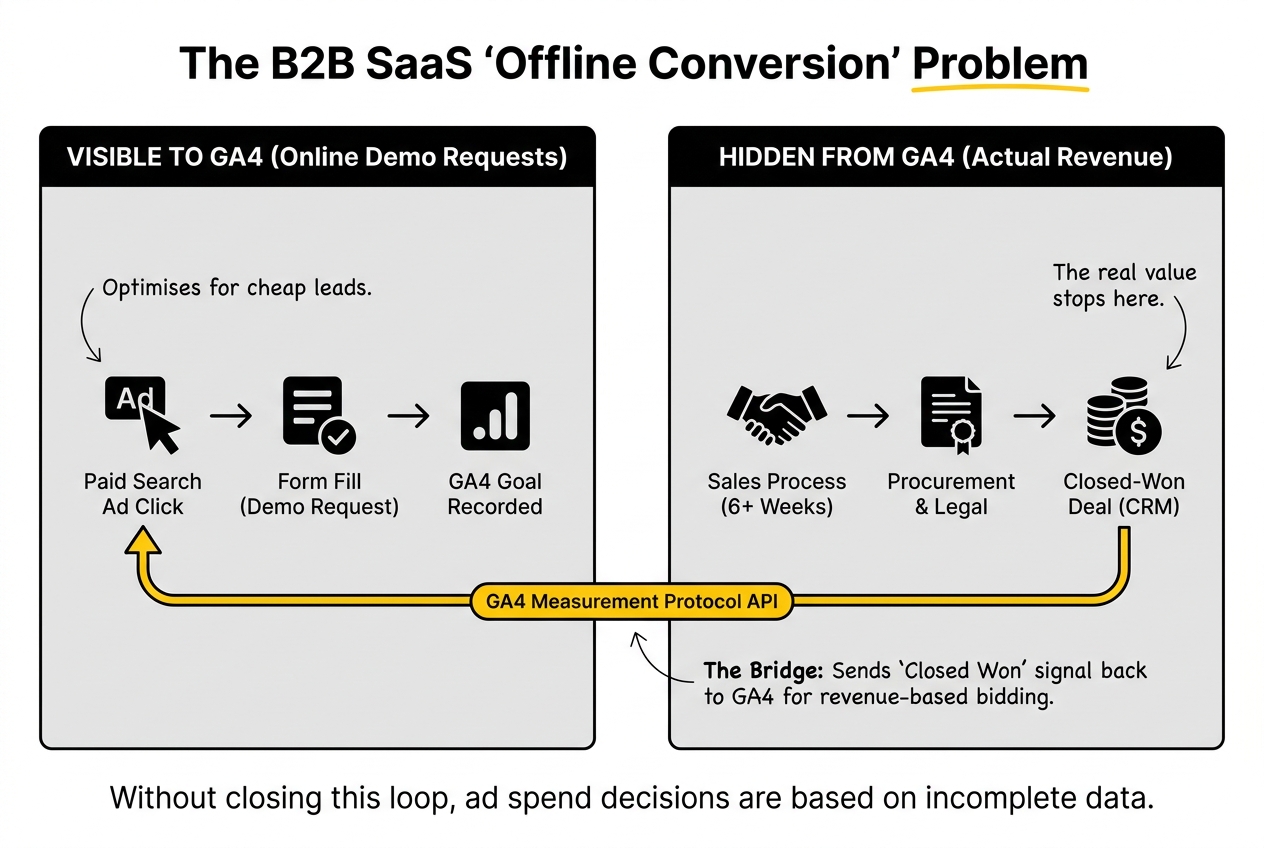
A user clicks a paid search ad, fills in a demo request form, and becomes a GA4 conversion. Six weeks later, after a product demo, a procurement review, and a legal sign-off, they become a closed-won deal in Salesforce. GA4 recorded the first moment. It has no visibility into the second, unless you build the connection deliberately.
This is the offline conversion problem, and it is one of the most significant gaps in SaaS attribution. Without closing the loop between the CRM and GA4, paid media optimisation signals reflect demo requests, not revenue. Google Ads optimises toward the cheapest lead rather than the lead most likely to close. Campaign budget decisions are made on data that stops at the top of the sales funnel.
The mechanism for bridging this gap is the GA4 Measurement Protocol, a server-side API that allows you to send events directly to GA4 without a client-side page interaction. When a deal closes in the CRM, the Measurement Protocol can fire a “closed_won” or “sql_created” event back to GA4 and attribute it to the original session using a client ID or session ID stored at the time of the initial form submission.
This requires the GCLID and GA4 client ID to be captured and stored in the CRM contact record from the first touch. It requires a CRM workflow or RevOps automation to trigger the event at the right pipeline stage. And it requires the GA4 and Google Ads properties to be configured to receive and use that signal for bidding decisions.
Getting this right is not technically complex. It is operationally demanding. The data needs to flow correctly across every step, be validated regularly, and be resilient to CRM changes. For most internal SaaS marketing ops teams, it is the kind of project that gets started and then deprioritised.
Consent Constraints and Signal Loss
Consent management is no longer an edge case for SaaS marketing teams operating in Europe or targeting enterprise buyers with strict data governance requirements.
Consent constraints affect GA4 data collection when users decline tracking cookies. In a standard client-side GA4 setup, declining consent means no GA4 event fires. No session data, no conversion event, no attribution signal. For SaaS teams with a significant proportion of European traffic, or audiences in regulated industries, this can mean a material percentage of conversions simply disappearing from the measurement layer.
GA4’s consent mode offers a partial mitigation. When a user declines consent, consent mode sends cookieless, aggregate pings to GA4 rather than full event data. Google uses these signals alongside modelling to fill gaps in conversion reporting. The quality of that modelling depends on the quality of your consented data as a baseline, which reinforces the argument for clean event hygiene before anything else.
Server-side tagging adds another layer of resilience. By routing measurement data through a server you control before it reaches third-party platforms, you reduce signal loss from browser-level ad blockers and intelligent tracking prevention. According to Measure Marketing Pro’s 2026 analysis, roughly one third of all marketing signals are now affected by intelligent tracking prevention. A well-implemented server-side setup can increase trackable conversion volume from 65, 70% to over 90%.
For marketing ops leaders, the practical implication is that consent configuration is not a legal checkbox. It is a measurement decision with direct consequences for attribution accuracy and paid media optimisation signals.
What Agency Support Actually Looks Like
There is a useful distinction between an agency that does GA4 work and an agency that functions as a SaaS GA4 attribution consultancy for your measurement layer.
The former deploys tags, fixes broken events on request, and reports on what GA4 shows. The latter owns the integrity of the measurement system across GA4, GTM, and the CRM, ensures the offline conversion loop is closed, holds the GTM governance process, and flags data quality issues before they affect reporting decisions.
In practical terms, the second type of agency engagement looks like this:
- A documented event taxonomy with naming conventions, parameter specifications, and business logic for each tracked event
- A GTM governance process with access controls, release notes, and a post-publish validation checklist
- GCLID and GA4 client ID capture in the CRM for every inbound lead, enabling offline conversion stitching
- A consent mode configuration aligned to the team’s legal and data strategy requirements
- A regular data quality audit cycle, ideally quarterly, covering event accuracy, conversion duplication, attribution window settings, and CRM data freshness
The reduction in operational burden comes from consistency. Marketing ops leaders stop spending cycles reconciling discrepancies and start working from a shared source of truth across the analytics, paid media, and revenue teams.
Evaluating an Agency for GA4 Attribution Work
When assessing an agency’s GA4 and attribution capabilities, the right questions go beyond platform familiarity.
Ask how they handle GTM governance when internal developers also have container access. Ask what their process is for validating event accuracy after a site release. Ask whether they have experience closing the offline conversion loop via the Measurement Protocol or enhanced conversions, and what the CRM workflow looks like on their side. Ask how they configure consent mode and what signal loss they typically see before and after server-side tagging implementation.
The answers to these questions reveal whether the agency has worked through the operational details of integrating GA4 with CRM and GTM in a live SaaS environment, or whether their experience sits at the surface level.
Compatibility with your existing MarTech stack matters too. An agency experienced with HubSpot’s attribution properties and workflow automation is more useful to a HubSpot shop than one with deep Salesforce RevOps experience, even if the GA4 work looks identical from the outside. Data integrity depends on the handoff points between systems, and those differ meaningfully across CRM platforms.
Practical Takeaways
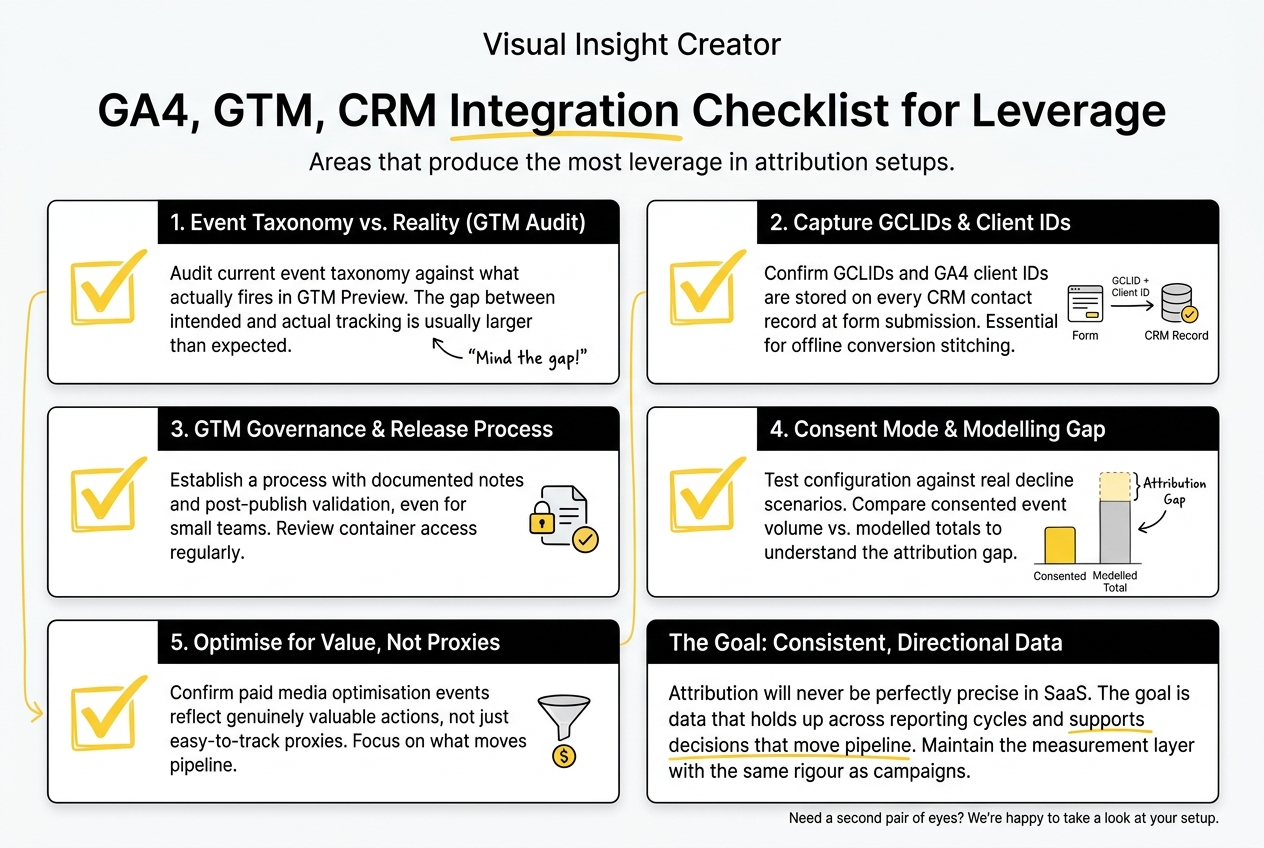
For marketing ops leaders building or reviewing a GA4 attribution setup, these are the areas that tend to produce the most leverage:
- Audit your current event taxonomy against what is actually firing in GTM Preview. The gap between intended and actual tracking is usually larger than teams expect.
- Confirm that GCLIDs and GA4 client IDs are being stored on every CRM contact record at the point of form submission. Without this, offline conversion stitching is not possible.
- Review GTM container access and establish a release process that requires documented notes and post-publish validation, even if the team is small.
- Test your consent mode configuration against a real decline scenario and compare consented event volume against modelled totals to understand the attribution gap.
- If paid media teams are optimising against GA4 conversion events, confirm those events reflect genuinely valuable actions rather than proxies chosen because they were easy to track.
Attribution will never be perfectly precise in a SaaS context. The goal is consistent, directional data that holds up across reporting cycles and supports decisions that move pipeline. Getting there requires the measurement layer to be maintained with the same rigour as the campaigns it supports.
If you are working through this, we are happy to take a look at your current setup.
Frequently Asked Questions
How can agencies help optimise GA4 attribution for SaaS teams?
An agency that specialises in SaaS GA4 attribution service support brings a structured approach to event taxonomy, GTM governance, CRM integration, and ongoing data quality. Rather than fixing issues reactively, the right agency establishes processes that prevent measurement drift, closes the offline conversion loop between the CRM and GA4, and maintains the system across team and product changes. The result is a more reliable signal for paid media optimisation and more accurate pipeline attribution reporting.
What are the common challenges when integrating GA4, GTM, and CRM?
The most frequent issues are events that fire incorrectly or inconsistently, GTM containers modified without documentation or validation, GCLIDs not being stored in CRM contact records, and offline pipeline stages invisible to GA4. These problems compound each other. An inaccurate event fires, the paid media team optimises toward it, and the CRM shows a different conversion story. Reconciling the discrepancy manually becomes a recurring operational burden for marketing ops teams.
How does event hygiene impact GA4 attribution accuracy?
Event hygiene determines the quality of the data that enters the attribution model. If an event fires at the wrong moment, carries incorrect parameters, or has been duplicated across naming conventions, the attribution model works from flawed inputs regardless of how sophisticated the model itself is. Marketing operations GA4 best practices start here: consistent naming, correct trigger logic, parameter-level context, and a documented owner for each event in the taxonomy.
What role does GTM governance play in effective GA4 tracking?
GTM governance ensures that the tracking layer remains accurate and maintainable as teams and products change. Without it, containers accumulate undocumented tags, triggers fire in unintended ways, and releases from developers or new agency handoffs break existing events. GTM’s built-in version history, access controls, and preview mode provide the infrastructure for governance. The actual practice requires a process: who can publish, what documentation is required, and how events are validated after each release.
How can offline conversions be accurately tracked in GA4?
The GA4 Measurement Protocol allows you to send server-side events directly to GA4, which is the mechanism for importing offline conversion data from a CRM. When a deal progresses to a qualifying pipeline stage or closes, a workflow in the CRM triggers a Measurement Protocol event back to GA4, attributed to the original user session via a stored GA4 client ID. This requires the client ID and GCLID to be captured on the initial form submission and stored in the CRM contact record.
What consent constraints affect GA4 data collection?
In markets with GDPR or similar regulations, users who decline consent cookies do not generate standard GA4 event data. GA4 consent mode sends aggregate, cookieless signals when consent is declined, which Google uses to model estimated conversion figures. Server-side tagging can reduce additional signal loss caused by ad blockers and browser-level tracking prevention, improving the proportion of consented conversions that are successfully recorded.
How can agencies assist with data integrity across GA4, GTM, and CRM?
Agencies that function as a SaaS GA4 attribution consultancy maintain data integrity by owning the event taxonomy, the GTM governance process, the CRM integration for offline conversions, and a regular audit cycle across all three platforms. The value is continuity: measurement systems degrade under product releases, team changes, and platform updates. An agency that treats data integrity as an ongoing operational commitment rather than a one-off setup task keeps the system accurate through those changes.
What should marketing ops leaders consider when choosing an agency for GA4 optimisation?
Compatibility with your CRM platform matters as much as GA4 and GTM experience, since offline conversion stitching depends on CRM workflow capabilities. Ask about their GTM governance process, how they handle container access when developers are also publishing changes, and whether they have closed the offline conversion loop via the Measurement Protocol in a similar SaaS environment. Evidence of how they maintain data integrity across a long engagement is more useful than platform certifications alone.
How does the attribution model in GA4 differ from previous versions?
GA4 uses a data-driven attribution model by default, distributing conversion credit across multiple touchpoints based on observed contribution rather than applying a fixed rule such as last click or first click. This makes it better suited to SaaS buying journeys with multiple marketing interactions before a conversion. However, the quality of the data-driven model depends on sufficient conversion volume and clean event data. Universal Analytics used session-based, last-click attribution by default, which credited the final channel regardless of earlier touchpoints, consistently distorting the reported contribution of top-of-funnel activity.
What are the best practices for integrating GA4 with existing MarTech stacks?
Start by confirming that GCLIDs and GA4 client IDs are stored in CRM contact records from first touch. Deploy GA4 configuration through a governed GTM container rather than direct site code. Keep the marketing website and product application in separate GA4 properties rather than combining them, as mixing authenticated product usage with anonymous marketing behaviour distorts both sets of data. Configure consent mode to align with your legal obligations and audit the modelled conversion gap quarterly. Treat the integration as a system that requires ongoing maintenance, not a one-off implementation.


.png)