PPC Performance Collapse in B2B SaaS: A Root-Cause Checklist (Before You Blame the Algorithm)
Use this root-cause checklist to diagnose B2B SaaS PPC performance collapse before blaming the algorithm, bids, or automation alone.

What "Performance Collapse" Actually Means
Before running the checklist, establish what you are actually measuring. Performance collapse is not the same in every account, and misidentifying the symptom leads to misidentifying the cause.
There are three distinct collapse patterns in B2B SaaS PPC, and each points toward a different bucket of root causes.
Conversion volume collapse. The account is getting impressions and clicks but conversions have dropped sharply. This is most often a tracking failure, a landing page problem, or a form break. It is rarely a bidding or audience issue.
Lead quality collapse. Conversion volume is stable or even up, but MQL-to-SQL rate has fallen, sales is complaining about lead quality, and cost-per-opportunity is rising. This is most often an intent dilution problem: the account is generating conversions that are not commercially valuable. Match type drift, Smart Bidding optimising for the wrong signal, or a change in query mix are the common causes.
Pipeline collapse. Leads look fine on the surface, but pipeline and closed-won are declining. This is most often a signal integrity problem: the account is being optimised toward the wrong conversion events. It can also indicate a market shift or a product-market fit issue that is beyond the scope of PPC to fix.
Identifying which pattern you are in takes fifteen minutes and determines which part of the checklist to prioritise. Treating a lead quality collapse as a tracking problem, or a tracking failure as a bidding problem, produces fixes that do not address the actual break.
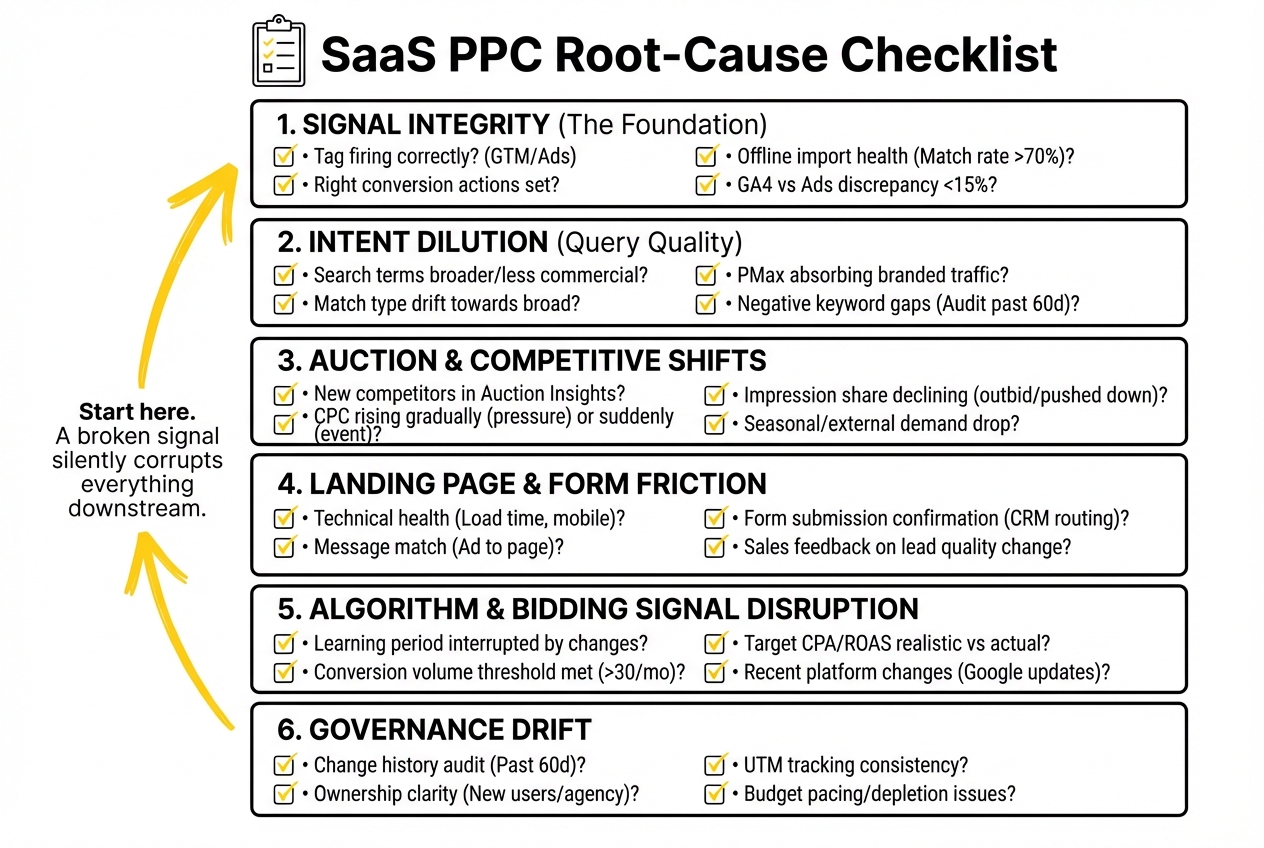
Root-Cause Bucket 1: Signal Integrity
This is the first place to look because a signal break silently corrupts everything downstream. When conversion tracking is broken, Smart Bidding has no reliable signal, and the algorithm will either under-bid (starving the campaign of traffic) or over-bid on low-quality signals (flooding it with the wrong traffic). Both look like performance problems. Neither is one.
Check 1: Tag firing. Open Google Tag Manager or Google Ads tag diagnostics and confirm that conversion tags are firing on the correct confirmation pages. A tag that stopped firing three weeks ago produces a gradual performance decline that looks like algorithmic drift but is actually a data gap. Check the last 30 days of conversion data in Google Ads and compare it against form submission data in your CRM. A divergence of more than 15-20% warrants investigation.
Check 2: Conversion action configuration. Are the conversion actions in Google Ads the ones the account should be optimising toward? Form fills are not pipeline. Demo requests are not closed-won revenue. If Smart Bidding is set to maximise conversions and the conversion event is a generic form submission rather than a qualified demo request, the algorithm is efficiently producing exactly the wrong outcome.
Check 3: Offline conversion import health. For accounts importing MQL or SQL events from the CRM, check the Google Ads Offline Data Diagnostics tab. A match rate below 70%, a stalled upload, or a format error in the import file will silently starve the algorithm of the revenue-linked signals it needs to bid correctly. This is one of the most common invisible causes of a lead quality collapse.
Check 4: GA4 versus Google Ads discrepancy. A sudden widening of the gap between GA4 conversion counts and Google Ads conversion counts often indicates a double-counting event in Google Ads (a conversion action firing on both a tag and a GA4 import), or a GA4 event that stopped firing. Either direction produces unreliable data for Smart Bidding.
If any of these checks surface a problem, stop and fix it before moving to the other buckets. A broken signal invalidates everything the algorithm has learned in the period since the break.
.jpeg)
Root-Cause Bucket 2: Intent Dilution
Intent dilution is what happens when the account expands beyond the high-intent queries that drove its original performance, either deliberately through match type broadening, or silently through Smart Bidding expanding reach in search of volume.
Check 5: Search terms report. Pull the search terms report for the last 30 days and compare it to the same period from the prior quarter. Are the queries triggering your ads as commercially specific as they were? A shift from exact-intent category terms toward broader, informational, or loosely related terms is a clear signal that the account’s query mix has diluted. This is particularly common in accounts that have recently switched to broad match or increased Smart Bidding targets.
Check 6: Match type distribution. If the account has a high proportion of broad match keywords and Smart Bidding is optimising for volume, the query mix will expand over time. The expansion is not always visible in CPC or impression share metrics, but it shows up in lead quality: more top-of-funnel queries, less commercial intent, more leads that sales will not touch.
Check 7: Campaign type audit. Performance Max campaigns regularly capture branded and high-intent search traffic that was previously served by standard Search campaigns. If a PMax campaign was added or expanded recently, check whether branded impression share on standard Search campaigns has declined. PMax absorbing branded traffic and inflating its own conversion rate is a common cause of apparent collapse in the rest of the account.
Check 8: Negative keyword gaps. A negative keyword list that has not been reviewed in several months will allow an increasing volume of irrelevant queries through as the account’s query mix naturally broadens. Run a negative keyword audit: pull all search terms with zero conversions and above-average cost from the last 60 days and assess whether they should be excluded.
Root-Cause Bucket 3: Auction and Competitive Shifts
Sometimes performance collapses not because anything internal changed, but because the competitive environment shifted. A new entrant bidding aggressively on the same terms, a review aggregator increasing its branded bidding presence, or a seasonal CPC spike in a competitive category can all drive up costs and reduce conversion rates without any change to the account itself.
Check 9: Auction Insights. Open the Auction Insights report for the core capture campaigns and check whether any new competitors have appeared, or whether existing competitors have significantly increased their overlap rate. A competitor moving from 20% to 60% impression share overlap in a 30-day window will increase CPCs and may intercept clicks that previously converted.
Check 10: CPC trend by campaign. Plot CPCs on core campaigns over the last 90 days. A gradual CPC increase that correlates with a gradual performance decline is most often competitive pressure, not an internal account problem. A sudden CPC spike that preceded the performance decline is almost certainly a competitive event.
Check 11: Impression share trend. If top-of-page impression share is declining while bids have not changed, the account is being outbid. If absolute top impression share is declining while top-of-page impression share is stable, the account is being pushed down the page but not out of it. Each pattern has a different response.
Check 12: Seasonal and external context. Before concluding that competitive pressure is the cause, check whether there is a seasonal demand shift or an external market event that might have reduced search volume or buyer intent for the category. A decline in impression volume at stable CPCs suggests demand has fallen, not competition has increased. These require different responses.
Root-Cause Bucket 4: Landing Page and Form Friction
A campaign that delivers the right traffic to a broken or degraded landing page will produce a conversion collapse that looks, in the platform, exactly like a targeting or bidding problem. Click-through rates may be stable. The platform reports healthy traffic. Conversions are gone.
Check 13: Page load and technical health. Run the landing pages through a basic technical check: load time, mobile rendering, form function. A form that stopped submitting correctly, a redirect that broke after a site update, or a mobile layout that is not converting phone traffic are all common causes of sudden conversion volume drops. Check Google Analytics or your analytics platform for a change in bounce rate or session duration that correlates with the performance drop.
Check 14: Form submission confirmation. If your conversion tag fires on a thank-you page, confirm the thank-you page is still reachable and that the form is routing submissions correctly to the CRM. A CRM webhook that stopped firing will not break the conversion tag (the thank-you page still loads) but will break lead capture downstream. The platform sees conversions. The CRM does not receive them.
Check 15: Message match. If the ad copy or the campaign’s keyword focus changed recently, check whether the landing page still matches the message visitors are arriving with. A landing page that was well-matched to one set of keywords may under-convert significantly when traffic composition changes, even if the page itself is technically functional.
Check 16: Sales feedback on lead quality. Ask the sales team directly: have the leads changed in the last four to six weeks? Are they from different company sizes, different roles, or asking different questions than they were previously? Sales feedback is often the earliest indicator of a landing page or intent dilution problem, arriving weeks before it surfaces in platform metrics.
Root-Cause Bucket 5: Algorithm and Bidding Signal Disruption
Only once the first four buckets have been cleared should the algorithm itself come under examination. In most B2B SaaS performance collapses, the algorithm is not the cause. It is the amplifier: it takes whatever signal break, intent dilution, or competitive shift is occurring and accelerates its impact through bidding decisions.
That said, there are scenarios where algorithm behaviour is genuinely the proximate cause of a collapse.
Check 17: Learning period disruption. Smart Bidding requires stability to learn. Significant bid changes, budget changes, conversion action changes, or campaign restructuring within the same period can push a campaign back into a learning phase, during which performance will be unpredictable and often worse. If multiple account changes were made in the four to six weeks before the collapse, the learning disruption itself may be the cause.
Check 18: Target CPA or ROAS target vs actual performance. If a Target CPA campaign has a target set significantly below the account’s achievable CPA, the algorithm will restrict impressions in search of conversions it cannot find. Check whether the Target CPA is realistic given recent performance data. A target set during a high-performing period may have become unachievable as competition increased or lead quality declined.
Check 19: Conversion volume threshold. Smart Bidding requires a minimum conversion volume to function reliably. As Search Engine Land’s coverage of the platform notes, below 30-50 conversions per month, Smart Bidding strategies are operating on insufficient data and will behave erratically. If conversion volume has dropped below this threshold for any reason, the bidding strategy may need to be adjusted to stabilise performance. Building a Scale-Ready SaaS PPC Engine After PMF: From Ad-Hoc to Operating System, also on this blog, takes this further.
Check 20: Recent platform changes. Google Ads regularly makes updates to how broad match, Smart Bidding, and Performance Max operate. Search Engine Land and WordStream are the most reliable sources for understanding whether a platform-level change may have affected account behaviour. Check both for any updates in the four weeks prior to the performance drop before concluding the account is the problem.
Root-Cause Bucket 6: Governance Drift
Governance drift is the slow accumulation of account changes, team transitions, or process failures that create conditions for collapse without any single visible trigger. It is the most common cause of collapses that cannot be explained by the other five buckets.
Check 21: Change history audit. Review the Google Ads change history for the 60 days before the performance drop. List every change made: bid adjustments, budget changes, keyword additions, match type changes, audience modifications, ad copy edits. Look for clusters of changes made in a short period, or changes made without a clear rationale. A pattern of untested changes made reactively is a governance problem, not a campaign problem.
Check 22: Ownership clarity. Who has access to the account? Has a new person been making changes, or has an agency transition occurred? Governance collapses most often happen during team handovers, when the incoming team makes changes before fully understanding the account’s configuration.
Check 23: UTM and tracking consistency. Has the UTM naming convention been applied consistently? A campaign launched without correct UTM parameters will appear in GA4 as direct traffic, breaking source attribution in the CRM and producing inaccurate pipeline reporting even if the campaign itself is performing correctly.
Check 24: Budget pacing and shared budgets. A shared budget that ran out mid-month will suppress impression share for all campaigns drawing from it, producing a performance drop that looks like a bidding problem but is simply a budget depletion issue. Check whether campaigns ran out of budget in any period that correlates with the collapse.
The First 48 Hours: What Not to Do
The most damaging response to a performance collapse is the reactive response: changing bids, pausing campaigns, restructuring ad groups, or switching bidding strategies before the root cause is identified. Each of these changes introduces new variables that make diagnosis harder and may push Smart Bidding into a new learning period that extends the recovery.
In the first 48 hours, the right actions are diagnostic, not corrective.
Pull the data. Work through the six buckets in order. Identify which bucket contains the break. Only once the cause is isolated should any corrective action be taken, and corrective action should be limited to what addresses the identified cause. Changing everything at once in response to a collapse is how accounts end up in a worse state than the one that prompted the panic.
If the checklist does not surface a clear root cause within the six buckets, the problem may be systemic enough to warrant a structured account review. For accounts where the collapse is persistent and multi-causal, the PPC account turnaround playbook for B2B SaaS covers the deeper structural rebuild. For accounts where the problem may be experimental in nature, the companion piece on why your SaaS PPC tests are not moving the needle covers diagnostic gaps in testing methodology.
Our SaaS PPC agency runs this checklist as the first step in every account review. If you are in the middle of a collapse and the cause is not clear, it is worth getting a second opinion before making changes that may deepen the problem.
.jpeg)
Frequently Asked Questions
Why did SaaS PPC performance suddenly collapse?
The most common root causes are: a conversion tracking break that stopped feeding reliable signals to Smart Bidding, intent dilution from match type expansion or Smart Bidding reaching for lower-quality queries, a competitive shift in the auction driving up CPCs, a landing page or form problem preventing conversions from completing, or governance drift from multiple untested account changes made in a short period. The algorithm is rarely the primary cause; it typically amplifies an underlying problem rather than creating one.
What should you check first before changing bids or budgets?
Signal integrity: confirm that conversion tags are firing correctly, that the right conversion actions are set as primary goals, and that offline conversion imports are functioning if in use. A tracking break silently corrupts Smart Bidding’s learning and produces performance problems that look like bidding failures but are actually data gaps. Fix the signal before changing anything else.
How do you tell whether a PPC collapse is caused by tracking or traffic quality?
Compare platform conversion counts against CRM lead counts for the same period. If the platform is reporting conversions that are not appearing in the CRM, the issue is downstream of the conversion (form routing, CRM webhook). If the platform is reporting fewer conversions than expected but CRM data is also down proportionally, the issue is either tracking or traffic quality. Check the search terms report to assess whether query intent has changed: a shift toward broader, less commercial queries indicates traffic quality. A sudden drop without query mix change points toward tracking.
When is the algorithm not the real problem?
When the collapse correlates with a change that preceded it: a tracking modification, a landing page update, a budget adjustment, a team transition, or an external competitive event. The algorithm responds to inputs. If the inputs changed, the algorithm’s behaviour will change accordingly. Blaming the algorithm for a tracking failure, an intent dilution problem, or a page break is like blaming a calculator for a wrong answer when the inputs were wrong.
What are the most common root causes of sudden PPC underperformance?
In order of frequency: broken or misconfigured conversion tracking, Smart Bidding optimising toward the wrong conversion event, match type drift broadening the query mix into lower-intent territory, Performance Max absorbing branded traffic from standard Search campaigns, a landing page or form technical failure, increased competitive auction pressure, and governance drift from multiple untested account changes.
How should SaaS teams triage a performance drop in the first 48 hours?
Identify the collapse pattern first: is it conversion volume, lead quality, or pipeline? Then work through the six root-cause buckets in order: signal integrity, intent dilution, auction shifts, page friction, algorithm behaviour, and governance drift. Do not make corrective changes until the root cause is identified. Reactive changes that introduce new variables make diagnosis harder and may extend the recovery period.
Which signals show the landing page is part of the collapse?
A rise in bounce rate or a fall in session duration on landing pages correlates with the performance drop. Form submission volume drops while click volume from the platform is stable. The conversion count in Google Ads is healthy but CRM lead intake has fallen, suggesting the form is not routing correctly. Sales feedback changes: leads are arriving with different characteristics than previously, or not arriving at all despite platform reporting showing normal activity.
When does a performance drop justify a full account turnaround?
When the root-cause checklist identifies structural problems across multiple buckets simultaneously, when the account’s tracking configuration is fundamentally broken rather than superficially misconfigured, when governance drift has produced an account structure that no longer reflects current campaign strategy, or when the collapse has persisted for more than six to eight weeks without improvement despite targeted fixes. A single-bucket problem with an identifiable cause rarely requires a full turnaround.
If performance has dropped and the cause is not clear, the checklist above is the starting point. Work through it systematically before making changes. The majority of B2B SaaS PPC collapses have a findable cause. Finding it first produces faster recovery with fewer additional problems than reacting before the diagnosis is complete.