Essential SaaS PPC Data & Access Checklist for B2B Success
Streamline your PPC campaigns with our essential checklist for Google Ads, Analytics, CRM connections, and offline conversion imports.

You’ve signed off on the agency engagement. The kickoff call went well. Everyone’s aligned on goals. Then week two arrives and the team is still waiting on Google Ads access. Conversion tracking is incomplete. The CRM connection hasn’t been scoped yet. A month of runway is gone before a single campaign has launched.
This is one of the most common and most avoidable delays in SaaS PPC onboarding. Not a strategy problem. Not a budget problem. A data access and permissions problem.
This checklist covers every critical access point, tracking dependency, and CRM connection your team needs to have in place before PPC campaigns go live. It’s built specifically for B2B SaaS marketing operations teams who need to move quickly without compromising data integrity or creating reporting inconsistencies downstream.
Why Data Access Is the Bottleneck Nobody Plans For
Most SaaS teams focus onboarding effort on the strategic brief: ICP, messaging, offer hierarchy, budget allocation. That work matters. But it can’t move ahead of the technical layer without creating problems.
PPC campaign performance in B2B SaaS is built on layered data signals. Google Ads needs conversion data to optimise bidding. Analytics needs correctly configured goals to report on pipeline contribution. Tag Manager needs structured triggers to capture the right events. CRM needs to feed back revenue data to close the attribution loop. If any of these layers is missing or misconfigured at launch, you’re not just flying blind: you’re actively training bidding algorithms on bad signals.
Getting fast onboarding right means resolving these dependencies before the first campaign brief lands on the table.
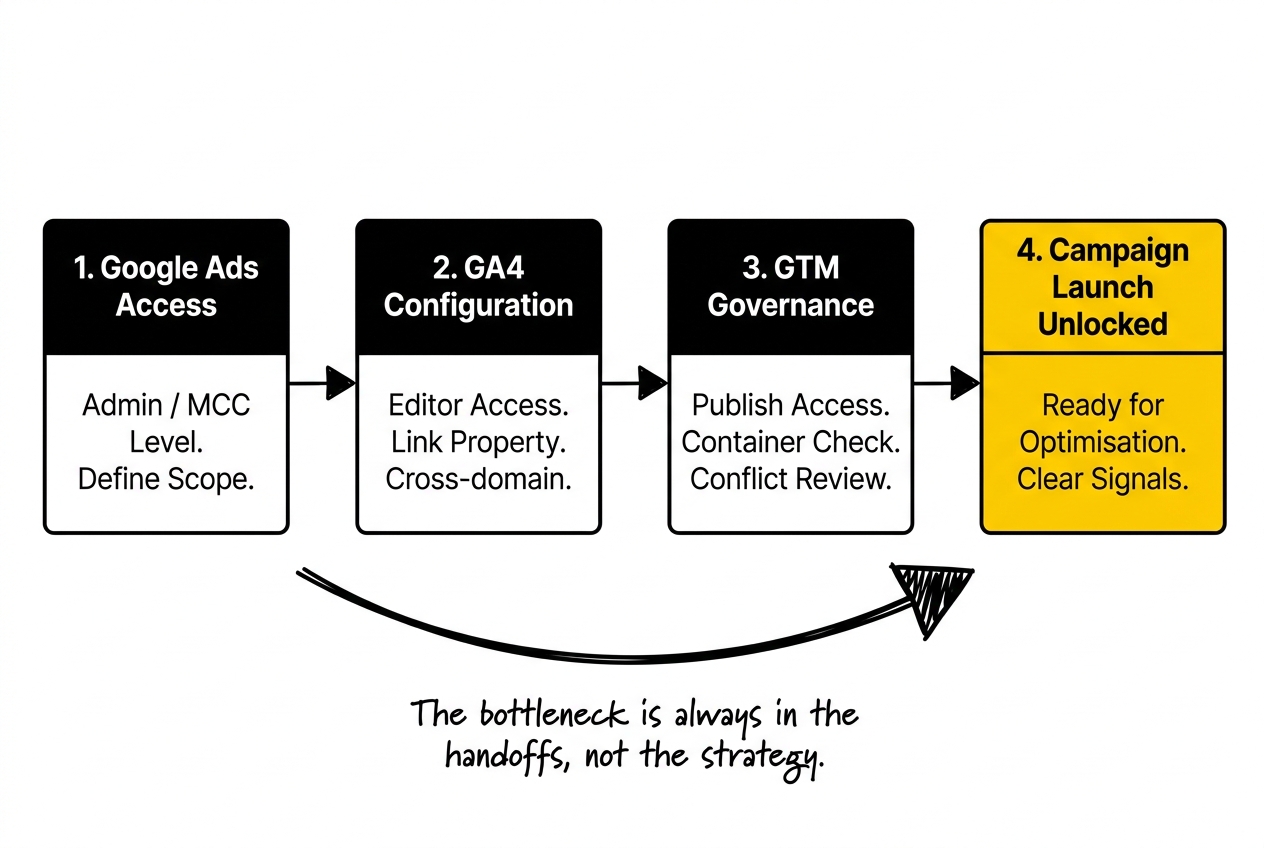
The SaaS PPC Data & Access Checklist
1. Google Ads Account Access
This is the most obvious item and still regularly delayed. Define the access structure before onboarding begins.
Access level required: Admin access for the agency, or Manager Account (MCC) linking if you’re working with an external team. Standard user access is insufficient for campaign structure changes, billing oversight, or conversion action configuration. Structuring SaaS PPC Accounts for PLG vs Sales-Led Funnels, also on this blog, takes this further.
Checklist items:
- Grant admin or MCC-level access to the managing team
- Confirm which Google Ads account IDs are in scope (avoid situations where a subsidiary account is missed)
- Verify billing access is separate from campaign access if required by your finance team
- Confirm the account’s conversion history and existing conversion actions: do not delete legacy actions before reviewing their role in automated bidding
If your Google Ads account is newly created, note that it will have no quality or performance history. This affects Smart Bidding ramp-up timelines and should be factored into your 30/60/90 plan.
2. Google Analytics 4 Access and Configuration
GA4 is where cross-channel attribution, audience building, and funnel reporting live. Incomplete access here creates reporting gaps that are hard to backfill.
Checklist items:
- Grant Editor access (minimum) in GA4 to the managing team
- Confirm the correct GA4 property is linked to the Google Ads account
- Verify that key conversion events are configured in GA4 and marked as conversions (demo requests, trial signups, contact form submissions)
- Check that GA4 is receiving data from all relevant domains, including subdomains used for product trials or app login
- Confirm that the GA4 data retention setting is set to 14 months, not the default 2-month window
- Review any existing goals or events imported from Universal Analytics: many are not automatically migrated and may need to be rebuilt
One area that often falls through: if your product runs on a subdomain (e.g., app.yourproduct.com), cross-domain tracking must be configured explicitly in GA4. Without it, a user who clicks an ad, lands on the marketing site, and then visits the app will appear as two separate sessions.
3. Google Tag Manager Access and Governance
For most B2B SaaS teams, GTM is the central hub through which all tracking fires. Governance matters here as much as access.
Checklist items:
- Grant Publish access to the managing team in GTM (Read/Edit is insufficient for deploying new tags)
- Confirm the GTM container is installed on all relevant pages, including thank-you pages, demo booking confirmation pages, and trial activation pages
- Document any existing tags firing in the container, particularly third-party tracking pixels that may conflict with new implementations
- Confirm a testing protocol: changes to GTM should be previewed and validated in staging before publishing to production
- Review any existing triggers for form submissions: many SaaS sites use embedded Calendly, Chili Piper, or HubSpot Forms, each of which requires a different trigger configuration
Google Tag Manager for PPC is the connective layer between your ad platforms and your analytics stack. If it’s not documented and governed properly, tracking breaks silently, which is worse than tracking that visibly fails.
4. CRM Connections for PPC Reporting
CRM integration is where most B2B SaaS PPC programmes fall short on attribution accuracy. Connecting the ad click to the closed-won deal requires deliberate configuration, not just a default integration.
Checklist items:
- Confirm CRM platform in use (HubSpot, Salesforce, Pipedrive, or other)
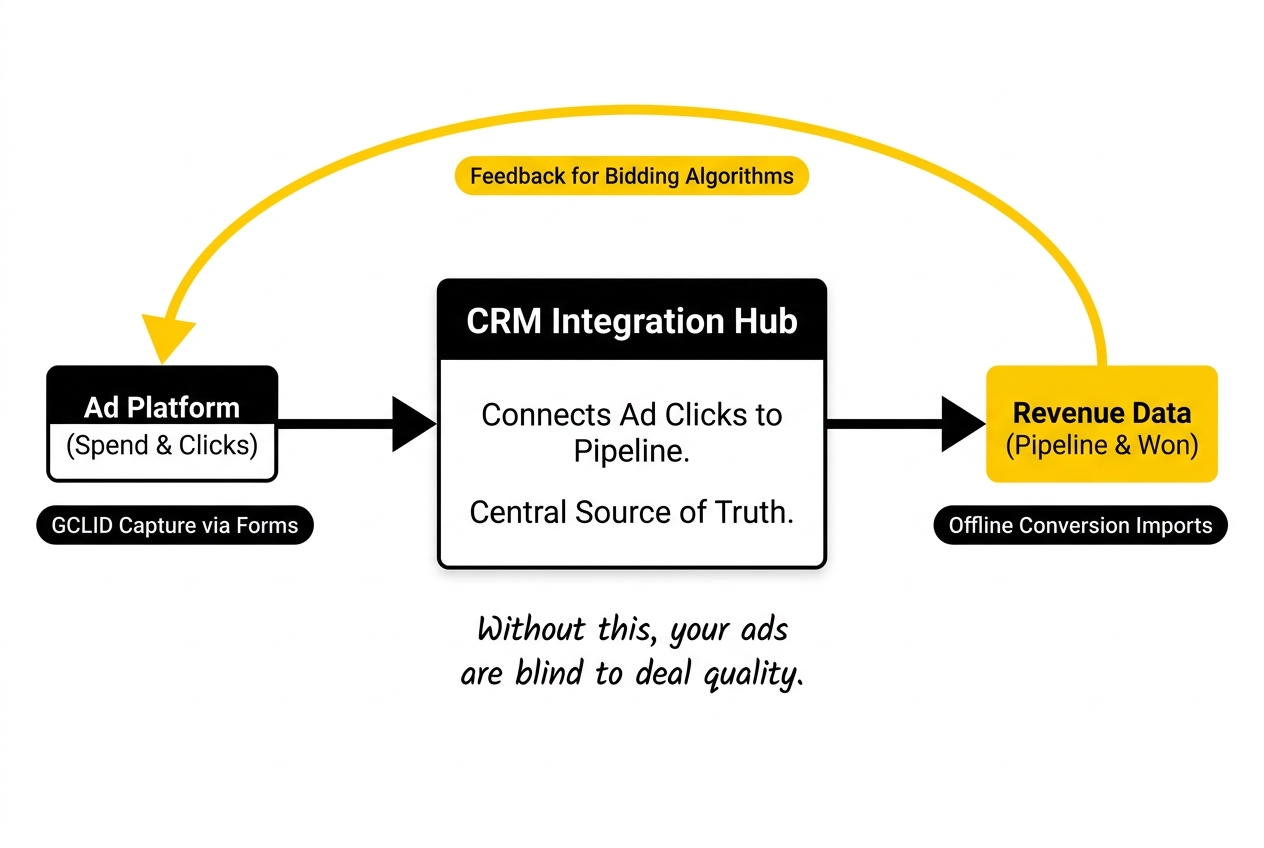
- Enable GCLID (Google Click Identifier) capture on all lead capture forms: this is the field that connects an ad click to a CRM contact
- Verify GCLID is being stored on the Contact or Lead object, not just the Form Submission object
- Map CRM lifecycle stages or deal stages to the conversion events you’ll import back into Google Ads (typically: MQL, SQL, Opportunity Created, Closed-Won)
- Confirm that the CRM has an integration with GA4 or a direct API connection for offline conversion imports
CRM connections for PPC are not just a reporting nicety. They are the mechanism by which your campaigns learn which clicks produce pipeline and which don’t. Without this loop closed, Smart Bidding is optimising for form fills, not qualified opportunities.
5. Offline Conversion Imports
This is the most frequently skipped item on most teams’ checklists, and it has the largest impact on campaign optimisation quality in B2B SaaS.
Offline conversion imports allow you to send revenue events from your CRM back to Google Ads. This means bidding algorithms can see not just which clicks produced a demo request, but which demo requests turned into SQL-stage pipeline or closed-won revenue.
Checklist items:
- Confirm GCLID capture is live and validated in the CRM before setting up imports (the import will fail silently if GCLIDs are missing)
- Define the conversion actions you will import: recommended minimum is MQL and Opportunity/SQL; closed-won is the gold standard but requires longer data collection cycles
- Set up the import method: manual CSV upload, Zapier/Make automation, or a direct Google Ads API integration
- Assign conversion values where possible: even a relative value (MQL = £100, SQL = £500, Closed-Won = £2,000) enables value-based bidding strategies
- Set conversion windows appropriately: B2B SaaS deals don’t close in 30 days; extend click conversion windows to 60 or 90 days to capture late-closing opportunities
The offline conversion imports checklist is where the gap between SaaS PPC and standard e-commerce PPC becomes most visible. If you’re running Target CPA bidding without offline conversion imports, you are optimising for the wrong signal entirely.
6. Permissions Tracking and Platform Access Summary
Beyond the core stack, there are secondary platforms where access delays cause disproportionate disruption.
LinkedIn Campaign Manager (if in scope):
- Grant Campaign Manager or Account Manager access
- Confirm Insight Tag is installed via GTM
- Verify Matched Audiences are connectable from your CRM
Microsoft Advertising (if in scope):
- Link to Google Ads for tag and conversion import (saves significant setup time)
- Confirm UET tag installation
Landing Page and CRO Platforms:
- Grant access to Unbounce, Instapage, Webflow, or your page builder of choice
- Confirm tracking scripts fire correctly on variant pages, not just control pages
- Check that form submissions on landing pages pass GCLID values to the CRM (this breaks more often than you’d expect when custom landing pages are used)
Call Tracking (if relevant):
- Confirm CallRail, Infinity, or equivalent is installed and routing correctly
- Ensure call conversions are configured in Google Ads and mapped to the correct lifecycle stage in the CRM
7. Data Dependencies and Reporting Infrastructure
The final layer is the reporting and governance infrastructure that keeps everything running after launch.
Checklist items:
- Define the primary reporting dashboard and confirm data sources are correctly connected (Looker Studio pulling from GA4 and Google Ads is standard; confirm the data freshness window)
- Establish a conversion discrepancy protocol: Google Ads and GA4 will never show identical conversion numbers; agree on which platform is the source of truth for which metric
- Document the full tagging and tracking setup in a shared Wiki or Notion doc: this is the single biggest gap in most SaaS MarTech stacks and the first thing that causes problems when team members change
- Confirm that any UTM parameter conventions are standardised across all paid channels so GA4 source/medium attribution is consistent
- Schedule a quarterly data audit to catch configuration drift: tags break, CRM fields get renamed, and integrations fail silently in ways that only become visible months later
Data integrity in PPC campaigns is not a one-time setup task. It’s an ongoing operational responsibility. The checklist gets you to a clean start. The audit process keeps it clean.
.jpeg)
Before You Hand Over Access: A Note on Security
Granting admin access to an external team is a reasonable concern. The solution is not to reduce access levels (which creates capability gaps) but to use structured access management.
For Google Ads, use Manager Account linking rather than adding individuals as users. This means access can be revoked in a single action if the relationship ends. For GA4, use role-based access and avoid sharing credentials. For the CRM, create a dedicated API user with the minimum required permissions rather than using a named employee’s account.
B2B SaaS PPC best practices include access management as a standing item in the agency contract, not an afterthought.
Upraw’s View on the Checklist
Most teams treat this as a one-off onboarding exercise. It isn’t. Every new channel, every CRM migration, every platform update can create gaps in this checklist. We treat it as a living document for every client we work with, reviewed at the start of each quarter. Onboarding Plan for Series A+ Teams with a SaaS PPC Agency, also on this blog, takes this further.
The other thing most checklists miss: the difference between access being granted and access being verified. It’s not enough to receive an invite to a Google Ads account. The test is whether you can see conversion data flowing, confirm that GCLID capture is working, and validate that offline conversions are importing correctly. Verification is the last step on every item here.
If you’re preparing for agency onboarding or auditing your current setup, this checklist is the starting point. For a deeper view on how this connects to your broader MarTech integration strategy, the Marketing Operations Playbook: Integrating Your Martech Stack for Clean SaaS PPC Data covers the strategic architecture in detail.
Frequently Asked Questions
What are the key components of a PPC data and access checklist for SaaS?
The core components are: Google Ads account access (admin or MCC level), GA4 configuration and linking, Google Tag Manager governance, CRM connection with GCLID capture, and offline conversion import setup. Supporting items include landing page tracking, secondary ad platform access, and call tracking where relevant. Each component has dependencies on the others, so the order of setup matters as much as the setup itself.
How can marketing operations specialists ensure data integrity in PPC campaigns?
Data integrity in PPC campaigns starts with a documented tracking setup, a standardised UTM convention across all paid channels, and a defined conversion discrepancy protocol between platforms. Ongoing data integrity requires quarterly audits to catch configuration drift, particularly after CRM updates, platform migrations, or team changes that affect access credentials.
What permissions are necessary for effective PPC campaign management in the B2B SaaS sector?
At minimum: Admin or MCC access in Google Ads, Editor access in GA4, Publish access in Google Tag Manager, and a CRM integration that captures GCLIDs on all lead forms. Secondary platforms (LinkedIn, Microsoft Advertising) require Campaign Manager access. Access should be role-based and granted to teams rather than individuals where possible, to simplify offboarding.
How do Google Ads, Analytics, and Tag Manager integrate for SaaS PPC campaigns?
Google Tag Manager fires the tracking tags that send data to GA4 and Google Ads. GA4 receives event data and can pass conversion signals back to Google Ads via linked accounts. Google Ads uses conversion data from GA4 (and from offline conversion imports) to optimise automated bidding. The dependency chain is: GTM fires correctly, GA4 receives clean events, Google Ads receives conversion data, bidding optimises toward the right signals.
What role does CRM play in PPC campaign tracking for SaaS businesses?
The CRM is the bridge between ad clicks and revenue outcomes. It captures the GCLID attached to each inbound lead, maps that click to a lifecycle stage, and feeds conversion events back to Google Ads via offline conversion imports. Without CRM integration, Google Ads optimises based on form fills rather than pipeline and revenue, which produces high volume at low quality in most B2B SaaS programmes.
How can offline conversion imports enhance PPC reporting accuracy in SaaS?
Offline conversion imports allow bidding algorithms to see which clicks produced qualified pipeline and closed-won revenue, not just lead form submissions. In B2B SaaS, where sales cycles run weeks to months and deal quality varies significantly by source, this is the difference between a campaign that optimises toward MQL volume and one that optimises toward cost-per-opportunity or cost-per-closed-won. The data latency is real, but the signal quality improvement is significant.
What are the best practices for onboarding PPC agencies in the SaaS industry?
Resolve technical access before the strategy brief. Define a GCLID capture standard before any campaign goes live. Agree on a conversion naming convention in Google Ads that maps to CRM lifecycle stages. Document everything in a shared tracking reference doc. And treat access verification as a distinct step from access granting: confirmation that data is flowing correctly is the real handover milestone.
What common challenges do SaaS companies face in managing PPC data access?
The most common challenges are: delayed access due to internal security reviews slowing the MCC linking process; GCLID capture not configured on forms built in third-party tools (HubSpot Forms, Calendly, Chili Piper); cross-domain tracking breaking when the product lives on a different subdomain to the marketing site; and conversion actions accumulating over time without review, causing bidding algorithms to optimise against outdated or duplicate signals.
How can data dependencies impact the success of PPC campaigns in the SaaS sector?
Each platform in the stack depends on clean input from the layer below it. If GTM tags aren’t firing correctly, GA4 receives incomplete data. If GA4 conversion events are misconfigured, Google Ads bidding trains on noise. If GCLID capture is broken in the CRM, offline conversion imports fail silently. A single broken dependency creates compounding inaccuracies across reporting and optimisation. The checklist approach exists precisely because these dependencies are linear, not parallel.
If you’re working through this setup and want a second pair of eyes on your tracking configuration before launch, we’re happy to take a look. Talk to the team.