Leveraging Salesforce & HubSpot for Effective Landing Page Feedback
How to carry landing page data through HubSpot and Salesforce, then use lifecycle stages and sales notes to judge and improve each page on pipeline, not form fills.

Your landing page team judges pages on conversion rate. Your CRM knows which pages produced pipeline. In most SaaS businesses, those two facts never meet.
The data exists. HubSpot records which page a contact converted on. Salesforce records whether that contact became an opportunity, what sales thought of them, and whether the deal closed. What’s usually missing is the plumbing that carries the page identity all the way through and brings the outcome back to the people deciding what to change on the page.
This article covers how to build that loop. Salesforce HubSpot integration for landing page feedback comes down to a handful of fields, a few governance decisions and a monthly review habit. Done well, it lets you judge every landing page iteration on pipeline rather than form fills, without adding another tool to the stack.
What a CRM Feedback Loop for Landing Pages Is
A CRM feedback loop for landing pages captures the page and variant a lead converted on and carries that through the CRM. It then joins it to lifecycle progress and sales feedback, so each page can be judged on the pipeline it produces. It turns the CRM from a record of leads into a source of evidence for landing page decisions.
The difference from standard CRM reporting is the unit of analysis. Most CRM reporting answers “which campaign drove pipeline?” This loop answers “which page, and which version of it, drove pipeline, and what did sales say about the leads it produced?”
That question matters because campaigns and pages fail differently. A campaign can bring the right audience to a page that sets the wrong expectations. Campaign-level reporting can’t see that. Page-level reporting can.
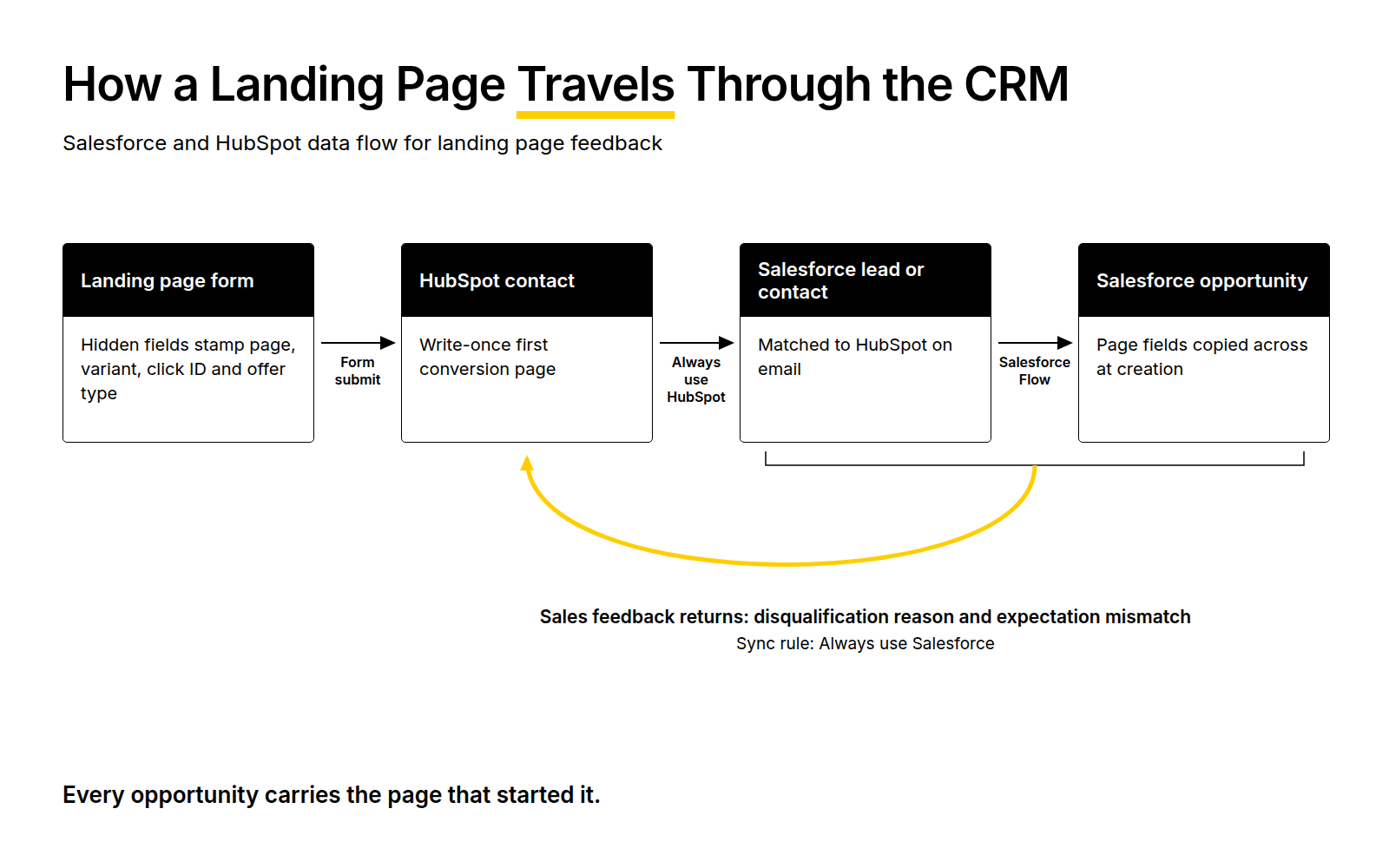
The Fields That Carry a Page Into the CRM
Integrating Salesforce and HubSpot CRO data for landing page insights starts at the form. If the page identity isn’t captured at the moment of conversion, nothing downstream can recover it.
Four fields do most of the work:
- Conversion page: the URL or page ID where the lead converted. Capture it in a hidden form field, and store it as a write-once property so later conversions don’t overwrite it.
- Page variant: the test variant the visitor saw. Without this, you can’t judge A/B tests on downstream outcomes.
- Click ID and UTM parameters: the GCLID and campaign parameters, so page performance can be split by traffic source.
- Offer type: demo, trial, content download or contact. Leads from different offers should never be compared directly.
Write-once matters more than it looks. HubSpot contacts often convert several times, and a property that updates on every conversion will credit the most recent page, not the one that created the lead. Keep a separate “first conversion page” property that’s stamped once and never changed. Then decide explicitly which one your reporting uses.
Getting the Fields Into Salesforce
The HubSpot integration with Salesforce syncs HubSpot contacts to Salesforce leads and contacts. The integration matches records using email addresses, then syncs property values based on your field mappings and selected sync direction. Map each page field to a matching custom field on both the Salesforce lead and contact objects.
For each mapping, you choose a sync direction: Two-way, Always use Salesforce or Always use HubSpot. Set the page fields to “Always use HubSpot”. Marketing captures them, and nobody in sales should be able to change them.
Carrying the Page Onto the Opportunity
This is the step most setups miss. Opportunities in Salesforce are created from contacts or converted leads, and the page fields don’t move across automatically. Use a Salesforce Flow to copy the conversion page, variant and offer type from the primary contact onto the opportunity when it’s created.
Without this step, you can report page performance up to the lead stage and nowhere further. With it, every opportunity, and every closed-won deal, carries the page that started it.
Lifecycle Changes as Landing Page Signals
Once the page identity travels with the record, lifecycle changes become page-level signals. Each stage transition tells you something different about the page:
- Lead to MQL: whether the page attracts the right profile of visitor.
- MQL to SQL or sales accepted: whether the page set accurate expectations about the product, price and use case.
- Opportunity to closed-won: whether the page attracted buyers with genuine intent and budget.
Report stage conversion rates by page monthly. Both platforms can stamp the date a record enters each stage, which also lets you measure velocity. A page whose leads take twice as long to reach SQL is telling you something, even if its conversion rate looks fine.
One governance rule prevents most lifecycle problems: decide which system owns each stage. If HubSpot sets MQL and Salesforce sets SQL and beyond, map those fields with one-way sync rules. Two-way sync on lifecycle fields invites records to flip between stages as each system overwrites the other, and page-level reporting becomes meaningless.
Turning Sales Notes Into Landing Page Changes
Lifecycle data tells you where a page’s leads stall. Sales notes tell you why. The problem is that free-text notes are hard to analyse at scale, and most of them never get read by anyone working on the page.
The fix is to add structure without taking away the notes. Add two picklist fields on the Salesforce lead or opportunity:
- Disqualification reason: a short fixed list such as wrong company size, no budget, wrong use case, student or job seeker, and existing customer.
- Expectation mismatch: what the lead expected that the product didn’t match, such as expected a free plan, expected different pricing, expected a different feature, or unclear what the product does.
The second field is the one that matters for landing pages. Disqualification reasons mostly point to targeting. Expectation mismatches point directly at page copy, pricing visibility and the call to action. Sync both fields back to HubSpot with “Always use Salesforce”, so marketing can report on them by conversion page.
Keep the free-text notes too, and read them monthly for the pages with the weakest stage conversion. The picklists tell you how often a problem occurs. The notes tell you how buyers describe it, which is often the exact language a revised page needs. The process of turning SDR insight into lead quality improvements is covered in Building a Sales Feedback Loop for PPC. The focus here is narrower: getting that feedback onto the page.
A Framework for CRM-Informed Landing Page Iteration
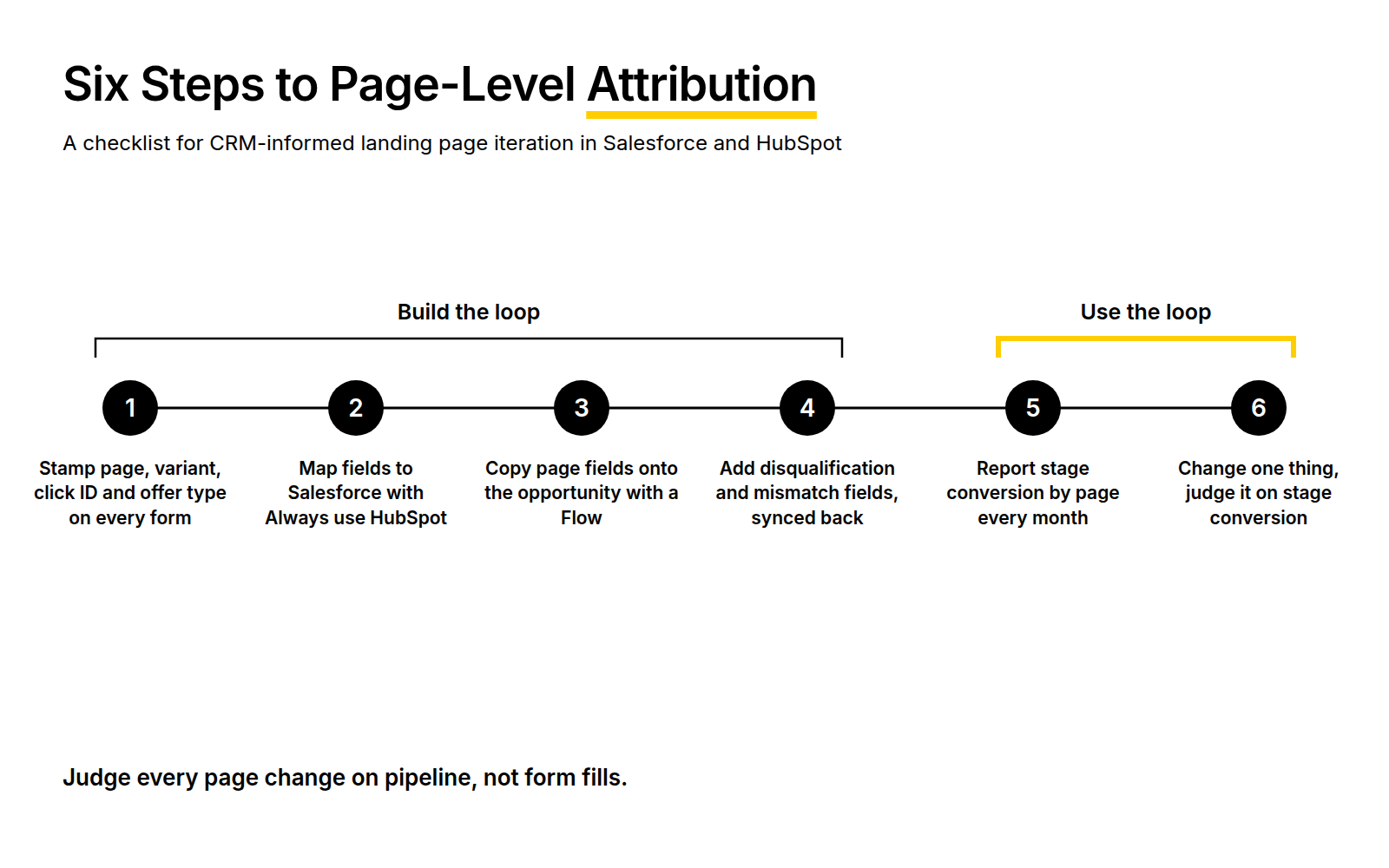
These are the best practices for CRO in Salesforce and HubSpot, in the order to implement them:
- Stamp conversion page, variant, click ID and offer type on every form submission using hidden fields.
- Map those fields to Salesforce leads and contacts with an “Always use HubSpot” sync rule.
- Copy the page fields onto each opportunity at creation using a Salesforce Flow.
- Add structured disqualification and expectation-mismatch fields, and sync them back to HubSpot.
- Report stage conversion and velocity by conversion page every month.
- Pick the weakest page, read its sales notes, change one thing and judge the change on stage conversion, not form fills.
Consider an illustrative example. Two demo pages for the same product receive similar paid traffic. Page A produces 120 form fills a month, and 38% reach SQL, about 46 SQLs. Page B produces 140 form fills, but only 14% reach SQL, about 20 SQLs. On conversion rate, Page B looks like the better page.
The expectation-mismatch field shows the most common reason on Page B is “expected a free plan”. The page’s call to action says “Get started”, which reads like a self-serve sign-up. The change to test is a “Book a demo” call to action plus a line on how pricing works, judged on SQL rate rather than form fills. Without the CRM loop, the team would have been optimising Page B’s conversion rate and producing more of the wrong leads.
Data Integrity in Marketing Operations
None of this works if the data can’t be trusted. Data integrity in marketing operations is the part of the project that takes the most time and gets the least attention. These are the issues worth getting right from the start.
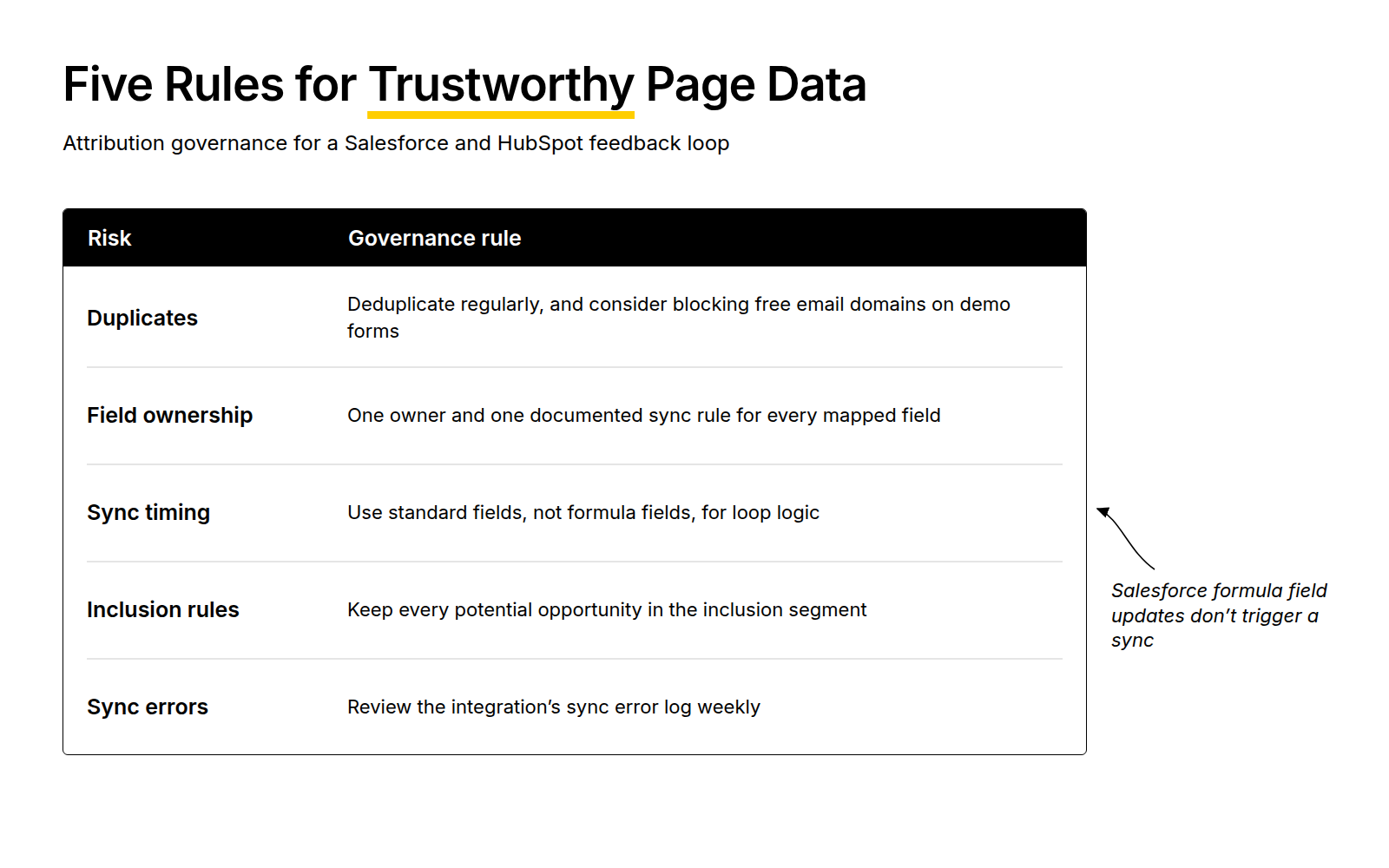
Duplicates. Because the integration matches on email, a buyer who converts with a personal address and later with a work address becomes two records. Their page history splits in two. Deduplicate regularly, and consider blocking free email domains on demo forms.
Field ownership. Every mapped field needs one owner. Document which system owns each field, its sync rule and its purpose, and review that document whenever someone adds a mapping.
Sync timing. HubSpot checks for new or updated information across both accounts approximately every 15 minutes, and updates to a Salesforce formula field don’t trigger a sync. If you build lifecycle or disqualification logic on formula fields, changes may not reach HubSpot when you expect. Use standard fields for anything the feedback loop depends on.
Inclusion rules. An inclusion segment controls which HubSpot contacts sync to Salesforce. Use one to keep junk and unqualified contacts out of the CRM, but check that every contact who could become an opportunity is in it, or their page data never arrives.
Sync errors. Review the integration’s sync error log weekly. A single broken mapping can silently stop page fields arriving for weeks.
Feeding the Same Data Into Paid Media
The fields that power landing page feedback also power paid media optimisation strategies. Once each opportunity carries its conversion page and click ID, you can see which pages turn paid traffic into pipeline. You can also route more budget to them.
The same stage data is what you’d import into Google Ads as offline conversions, so bidding learns from SQLs and opportunities rather than form fills. Attribution accuracy improves too, because pipeline is credited to a specific page and campaign rather than inferred from platform data. Offline Conversion Optimisation with SaaS Revenue Signals covers that import in detail. For the wider picture of CRM signals in paid acquisition, see Maximising Paid Acquisition Signals through GTM CRM Integration.
If you’re already reporting closed-won revenue by campaign, page-level reporting builds on the same foundations. Our guide to integrating Salesforce or HubSpot with SaaS PPC for closed-won reporting covers that base layer.
Landing Page Optimisation Tools for Salesforce and HubSpot
You don’t need a new platform for any of this. The native connector, hidden form fields, a Salesforce Flow and the reporting tools in either system cover the core loop.
The main addition worth considering is a dedicated reporting layer if your team struggles to join HubSpot and Salesforce data in one view. Our approach to saas analytics is built around exactly that join.
CRM data also has limits. It tells you which pages produce pipeline, not why a page fails technically. Before rewriting copy on a weak page, check page load time and on-page behaviour in your analytics tool. A slow page or a broken form on mobile will look like a messaging problem in the CRM.
Common Challenges and How to Handle Them
These are the problems that come up most often when teams build this loop:
- Sales doesn’t fill in the new fields. Make them required at the stage change, keep the picklists short, and show sales what changed as a result.
- Page data stops at the lead. The opportunity Flow is missing or broken. Test it with a dummy record whenever the opportunity process changes.
- Reporting credits the wrong page. The conversion page property updates on every conversion. Add a write-once first conversion page field.
- Too little volume per page. Group pages by template or offer type, and review quarterly rather than monthly.
- Two-way sync on lifecycle fields. Records flip between stages. Set one owner per field.
Frequently Asked Questions
How can integrating Salesforce and HubSpot enhance landing page optimisation?
It lets you judge landing pages on pipeline rather than form fills. By capturing the conversion page in HubSpot and carrying it through Salesforce to the opportunity, you can see which pages produce sales-qualified leads and closed-won deals. Sales feedback synced back to HubSpot then shows why weaker pages underperform.
What are the benefits of using CRM data for conversion rate optimisation?
CRM data shows what happens after the form fill, which is where B2B landing pages succeed or fail. It reveals pages that convert well but produce poor leads, and pages with lower conversion rates that generate more pipeline. It also captures sales feedback that points to specific copy, pricing or call-to-action changes.
How do lifecycle changes in CRM systems impact landing page performance?
Lifecycle changes are page-level signals once each record carries its conversion page. Low MQL rates suggest the page attracts the wrong profile. Low SQL rates suggest it sets inaccurate expectations. Slow movement between stages can point to weak buying intent. Reporting stage conversion and velocity by page shows which signal applies.
What role do sales notes play in improving landing page iterations?
Sales notes explain why leads from a page fail, often in the buyer’s own words. Structured fields such as expectation mismatch show how often each problem occurs. The free-text notes provide the language a revised page needs. Together they turn sales conversations into specific, testable landing page changes.
How can Marketing Operations Specialists leverage data integrity in their CRO strategies?
By making the page data reliable enough to act on. That means write-once conversion page fields, one owner and one sync rule per mapped field, and regular deduplication. It also means avoiding formula fields for sync-dependent logic and reviewing sync errors weekly. Without these, page-level pipeline reporting can’t be trusted.
What are the best practices for integrating Salesforce and HubSpot within a MarTech stack?
Document every field mapping, its owner and its sync direction. Use inclusion segments to keep unqualified contacts out of Salesforce, but confirm potential opportunities are included. Set one system as owner of each lifecycle stage. Copy key marketing fields onto opportunities with a Flow, and monitor sync health weekly.
How can effective attribution accuracy influence paid media optimisation?
Accurate attribution shows which pages and campaigns produce pipeline, so budget and bidding can follow real outcomes. When opportunities carry their conversion page and click ID, you can route paid traffic to the best pages. You can also import stage data into Google Ads as offline conversions, so bidding learns from qualified pipeline rather than form fills.
What actionable insights can be derived from CRM data to improve lead quality?
CRM data shows which pages, variants and offers produce leads that reach SQL and close. It also shows the disqualification reasons and expectation mismatches behind each page’s weak leads. Those insights point to specific changes: targeting for disqualifications, and page copy, pricing visibility or call to action for mismatches.
How can seamless integration of Salesforce and HubSpot drive revenue growth?
It focuses landing page and paid media effort on what produces revenue. Pages are improved based on pipeline evidence, budget moves to pages that convert traffic into opportunities, and bidding learns from qualified outcomes. Pipeline efficiency with CRM data comes from making each iteration count rather than testing on form-fill volume.
What challenges might arise when integrating Salesforce and HubSpot for CRO purposes?
The most common are duplicate records splitting page history, and conversion page fields overwritten by later conversions. Others include page data that never reaches the opportunity, two-way sync causing lifecycle stages to flip, and sales not completing new feedback fields. Low volume per page can also make monthly reporting unreliable.
If your CRM already holds the answers about which landing pages produce pipeline, but nobody working on the pages can see them, that’s usually a fixable plumbing problem. It’s the kind of setup we work through with SaaS marketing operations teams regularly, and we’re happy to look at yours.